優比快 Ubiquiti UniFi Professionals (持續更新)

et034264 wrote:
how to update controller ??
from 5.12.66 to 5.14.xx


要看你的 UniFi Controller 是安裝在那個設備上, 如果是 Cloud Key, UniFi Controller on Mac/Windows, 直接在 Controller Web UI 升級就可以了.
FB: Pctine
neo69805 wrote:
小弟昨天去controller裡面設定了幾個DNS (中華、Google、Seednet)
在此之前是完全空白的狀態
今天開始發生 要從我的最愛進入https://setup.ui.com/
發生無法連線到此頁面
原因是:DNS_PROBE_FINISHED_NXDOMAIN
但是如果是敲入192.168.1.1還是可以進入Controller
是因為我設定了DNS所以導致這個問題嗎?(因為https://setup.ui.com/是內網?)

在初次設置時, 你所使用的 USG or UDM 設備已啟用 DHCP server, 且 DNS server 指向 UniFi Router 本身, 此時你透過 browser lanunch setup.ui.com, 這 DNS 解析它被 UniFi Router 處理掉了. 因為它會幫你直接導到 UniFi Controller IP, 這是 DNS 解析上做的事. (市售其他 Router 分享器產品的做法都大致相同).

至於你設置好了之後, DNS 的設定到底是指向 UniFi Router 本身, 或是其他 DNS server, 其實並無所謂.

至於你提的再用 setup.ui.com 進不去管理畫面, 這部份其實不用太糾結, 如果在內網, 就直接設個捷徑吧, 指向 UniFi Controller IP 就好了.
FB: Pctine
pctine wrote:
網路不要設為 bridge...(恕刪)


原來如此, 以為是要設定為bridge 原來是要設host (筆記~)

不過目前是bridge 狀態下,解決的, 晚點再來改回來.

感謝PC大的答覆
pctine wrote:
要看你的 UniFi(恕刪)


on qnap nas with docker
et034264 wrote:
on qnap nas with docker


只在 Synology NAS Docker 做過, QNap NAS 上面的做法應該類似.

https://www.youtube.com/watch?v=hFEPPW5VJvc
FB: Pctine
UniFi Spanning Tree

UniFi Switch 預設是啟用 RSTP protocol, 有關於 Spanning tree 可以參考官網說明.

https://help.ui.com/hc/en-us/articles/360006836773-UniFi-USW-Configuring-Spanning-Tree-Protocol

一般家用 Switch 數量不多時, 應該就不會注意到這功能了, 至少要三台 Switch.

以手上的 UniFi Switch 小試了一下, 可以正常 work.

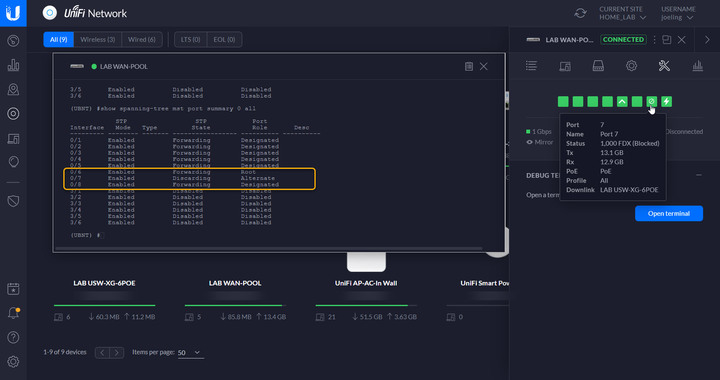
如圖, 共三台 Switch, Switch1 為 core switch, 以下各接了 Switch2 & Switch3, 而 Switch2 和 Switch3 再互串起來, 一般的非網管 Switch or 未啟用 STP/RSTP, 如此接法將造成 Loop & broadcast storm.

Switch 2 Port#6 uplink 至上一層 Switch1, 而 Port#7 為 backup link 至 Switch3 (狀態為 Discarding/Alternate)

FB: Pctine
UniFi Controller v6 正式版
 
v6 正式版已上架.
 
https://www.ui.com/download/unifi/


Important notes

What’s New in 6.0?

  • Introduce Beta Dashboard for UDM.
  • Implement Real-Time statistics for UDM.
  • Preview new Beta Settings.
  • Redesign, simplify and move Site, Controller, Maintenance, Remote Access and Backup configuration to System Settings.
  • Hide and auto-configure Data Retention for Statistics.
  • Redesign and move Wi-Fi AI configuration to System Settings page.
  • Redesign and move RADIUS and Switch Port profiles to Advanced Features page.
  • Redesign and move Services to Advanced Gateway Settings to Advanced Features page.
  • Move User Groups to Client Groups on Advanced Features page.
  • Redesign and move Wireless Networks configuration to Wi-Fi page.
  • Replace WLAN Groups with new AP Groups feature.
  • Simplify WiFi creation - WPA2 Security protocol with Password is set by default.
  • Allow selecting WPA2 Enterprise Security Protocol if at least one Radius profile is enabled.
  • Change VLAN ID numeric input to Network dropdown.
  • Integrate Guest Control with Hotspot configuration on Wi-Fi page.
  • Redesign and move LAN Networks configuration to Networks page.
  • Add Auto Scale Network feature.
  • Move VLAN Only Networks to Network Isolation in Advanced Features.
  • Update Content Filtering categories and move to Network configuration.
  • Add new Device Isolation (creates guest network if turned on) and Internet Access (blocks WAN access if turned off) toggles.
  • Redesign and move WAN Networks configuration to Internet page.
  • Redesign and move DPI configuration to Security page.
  • Redesign and move Threat Management configuration to Security page.
  • Introduce AP Groups feature.
  • AP Groups simplifies the way to configure Wi-Fi and arrange APs in logical groups.
  • That feature is replacing WLAN Groups and WLAN Overrides. It’s a breaking change and some corner cases may not covered by migration.
  • Some WLAN Group configurations have been migrated to individual Wi-Fi Network configurations.
  • Preview Auto Scale Network feature.
  • That feature automatically adjusts subnet size and DHCP range with avoiding network collision.
  • Add ability to report incorrect Wi-Fi Experience.
  • Add Survey for Beta Dashboard and Beta Settings.


Improvements
  • Add transition animations in Beta Settings.
  • Add buttons for guest client authentication and unauthentication.
  • Replace Speed test gauge with numbers.
  • Move PMF to WLAN configuration in Beta Settings.
  • Show AP promo placeholder in the new dashboard when there is no WiFi network created.
  • Show Original vendor logos when device logo is unavailable.
  • Remove Combine Name/SSID option from Settings.
  • Improve the user experience of AP Group validation in Beta Settings.
FB: Pctine
各位先進您們好

小弟不才想請問,我幫客戶將UAP架在他們的NAS上之後會產生以下幾個問題

1.總共6顆UAP,有兩顆市價在移動充電車上有需要的時候才會使用。一開始我用controller接管好之後
過下一次在連線時有一顆UAP會出現無法接管的情況。使用putty 進去那一顆時預設帳密無法使用。
(我是將該顆UAP直接RESET後重新接管成功)
2.NAS有設定每周日斷電一天,周一連線時經常使用的4顆UAP偶爾也會出現第一個問題的情況。
3.目前架構是Switch接POE直連UAP(非unifi switch),若是要使用MESH功能,是否network ssid只需要設定一組,在個別設定各個UAP的ssid即可?
1.總共6顆UAP,有兩顆市價在移動充電車上有需要的時候才會使用。一開始我用controller接管好之後
過下一次在連線時有一顆UAP會出現無法接管的情況。使用putty 進去那一顆時預設帳密無法使用。
(我是將該顆UAP直接RESET後重新接管成功)

>>> 這 UAP 如果是在移動的車上(或是外點), 先確定它本身所在的區網能夠連上 internet, 然後透過 controller public ip 接管即可.

2.NAS有設定每周日斷電一天,周一連線時經常使用的4顆UAP偶爾也會出現第一個問題的情況。

>>> 同前, 先確定你是不是透過 controller 的外網 IP 來做 remote adopt.

3.目前架構是Switch接POE直連UAP(非unifi switch),若是要使用MESH功能,是否network ssid只需要設定一組,在個別設定各個UAP的ssid即可?

>>> 非 unifi poe switch 無所謂, ssid 2.4g or 5g 是否相同也無所謂, 只要你確定接管成功.
FB: Pctine
FB: Pctine
文章分享
評分
評分
複製連結
請輸入您要前往的頁數(1 ~ 43)

今日熱門文章 網友點擊推薦!