【博物館首頁】Dave Täht 數位典藏博物館 (官方主站 - GitHub Pages):
https://tw641.github.io/
【音樂祭特別企劃】Dave's Guitar: Thank You Music Festival 2026:
(「謝謝」星空音樂祭 | Dedicated to Dave Täht & Every Unsung Hero in the World — and You.)
https://tw641.github.io/daves-guitar-2026/
【開源專案說明書】Padavan-CAKE 雲端編譯懶人包:
https://tw641.github.io/Padavan-CAKE/
[台灣 x 丹麥 x 瑞典] 國際最高權威 Bufferbloat.net 官方收錄與 Toke 博士親自修改:
Bufferbloat.net 全球官方認證名單:What Can I Do About Bufferbloat?
https://www.bufferbloat.net/projects/bloat/wiki/What_can_I_do_about_Bufferbloat/
官方審查合併紀錄 (PR #94):
https://github.com/tohojo/bufferbloat-net/pull/94
Toke 博士親自修正排版紀錄 (Commit c5961c7):
https://github.com/tohojo/bufferbloat-net/commit/c5961c7d341974c65b7d8749c80c5bc7e9e2bc92
【全球極速備援站】十全十美:10 大官方主站及鏡像備援網站
官方首頁在 Google PageSpeed Insights 針對極端環境的模擬測速中,
【效能、無障礙功能、最佳做法、SEO】四項指標皆達 100 滿分!
若主站無法連線,請使用以下分流節點 (皆支援直接加上
/daves-guitar-2026/ 或 /Padavan-CAKE/ 進入專屬子頁面):
1. Dave Täht 數位典藏博物館 (官方主站 - 託管於微軟 GitHub,絕對安全):
https://tw641.github.io/
2. Cloudflare Pages (臺灣 TPE 網路 - 全球最大 CDN 服務商,臺灣在地機房):
https://tw641.pages.dev/
3. Cloudflare Workers (全球邊緣網路 - 運用 Cloudflare 全球節點分散流量):
https://www.tw641.workers.dev/
4. Firebase Hosting (Google 官方全球 CDN - 由 Google 企業級基礎設施提供):
https://tw641t.web.app/
5. FirebaseApp (Google 備用網域 - 同樣隸屬 Google 官方防護網域):
https://tw641t.firebaseapp.com/
6. GitLab Pages (官方鏡像備援 - 託管於全球知名開源程式碼平台 GitLab):
https://tw641.gitlab.io/
7. Netlify (全球 CDN 網路 - 國際知名靜態網站託管服務商,連線穩定):
https://tw641.netlify.app/
8. Vercel (全球邊緣網路 - 知名開源框架原廠提供之企業級雲端服務):
https://tw641.vercel.app/
9. Render (雲端後端備援 - 知名矽谷新創雲端平台託管):
https://tw641.onrender.com/
10. Surge (隱藏版影子節點 / 跨歐美亞澳異質多雲備援):
(底層調用: DigitalOcean 全球機房 + Linode 東京機房 + Vultr 雪梨機房)
https://tw641.surge.sh/
For English version, please visit here.
 🇹🇼 全球首發!Taiwan No.1!🇹🇼
 TP-Link Archer C2 & Phicomm K2P 傳奇復活版韌體
這是世界上第一個成功將 CAKE 流控演算法 移植到 Padavan (Linux 3.4.113 核心) 的韌體!
我是世界上第一個成功將 CAKE 流控演算法 移植到 Padavan (Linux 3.4.113 核心) 的人!
感謝網路大神 Dave Täht 的 CAKE 流控演算法,讓我們能在舊裝置上體驗更流暢的網路!
希望這些韌體能讓大家的舊裝置重獲新生,享受高品質、低延遲的網路體驗!
🚀 韌體兩大亮點功能
1. 獨家移植 CAKE 演算法:有效解決網路擁塞,打遊戲、看影片不再轉圈圈。
2. 安全性全面升級:修補了原廠與舊版韌體中存在的嚴重安全漏洞 (CVE),讓您的舊路由器比以前更安全。
===================================================
🔧 科普小教室|什麼是CAKE?
===================================================
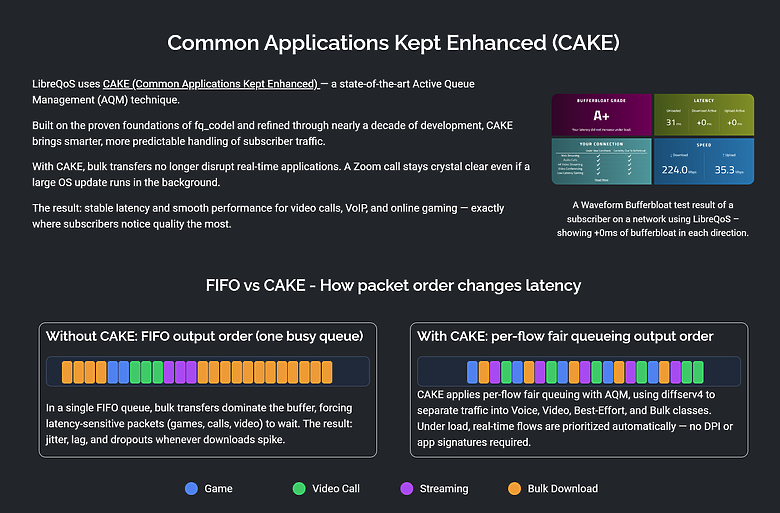
CAKE(Common Applications Kept Enhanced)是一種最先進的主動佇列管理 (AQM) 技術。
CAKE 建立在 fq_codel 的成熟基礎上,經過近十年的發展不斷完善,能夠更聰明、更可預測地處理訂閱者流量。
借助 CAKE,大量傳輸不再中斷即時應用程式。即使後台運行大型作業系統更新,Zoom 通話也能保持清晰流暢。
✨ 結果:視訊通話、VoIP 和線上遊戲均實現了穩定的延遲和流暢的性能✅
⚙️ 快速看懂運作原理
![[TW641]【Padavan + CAKE 移植】TP-Link Archer C2 V1 (with 3.4.113 Linux Kernel) & 斐訊 Phicomm K2P A1/A2 (with 4.4.198 Linux Kernel) (本專案已被 Bufferbloat.net 官方審查合併認證收錄)](https://attach.mobile01.com/attach/202601/mobile01-baf3e398154a8e98c46f7e7a778ea62e.png "點我看大圖")
CAKE(Common Applications Kept Enhanced)是一種現代且先進的 QoS(服務品質) 排隊算法。
它被設計為一種「全方位」的解決方案,旨在解決家用網路常見的網路壅塞與延遲問題。
以下是關於 CAKE 的核心重點:
1. 它主要解決什麼問題?
CAKE 最主要的目標是消除 Bufferbloat(緩衝膨脹)。
當你的網路頻寬被某個裝置(例如下載大檔案)佔滿時,其他應用(如線上遊戲、視訊會議)會出現嚴重的延遲,CAKE 能有效將延遲降至最低。
2. CAKE 的核心功能
流量整形 (Shaping): 限制進出頻寬,確保數據包不會在數據機等無法控制的節點堆積。
公平排隊 (Fair Queuing): 確保每個裝置、每個連線都能公平分配到頻寬,防止單一程式(如 P2P 下載)霸佔整個網路。
自動化管理: 相比舊型的 QoS 需要手動設定繁瑣的優先順序(Priority),CAKE 通常只需設定你的下載與上傳頻寬即可達到極佳效果。
DiffServ 優先級: 內建簡單的分類機制(如語音、視訊、普通流量),能更聰明地處理不同類型的數據。
3. 常見應用場景
CAKE 廣泛存在於開源路由器固件或專業設備中,例如:
OpenWrt:許多用戶透過其管理介面開啟 CAKE 來改善家用網路穩定性。
MikroTik (RouterOS):從 v7 版本開始正式支援 CAKE 作為排隊器類型。
IPFire:預設使用 CAKE 來處理 QoS 策略。
⚠️ 注意: 雖然 CAKE 非常強大,但它比較消耗 CPU 效能。在硬體較弱的路由器上處理超過 350 Mbps 以上的頻寬時,可能會成為效能瓶頸。
🔍 怎麼確認CAKE完美運行
![[TW641]【Padavan + CAKE 移植】TP-Link Archer C2 V1 (with 3.4.113 Linux Kernel) & 斐訊 Phicomm K2P A1/A2 (with 4.4.198 Linux Kernel) (本專案已被 Bufferbloat.net 官方審查合併認證收錄)](https://attach.mobile01.com/attach/202601/mobile01-b19a0e98a47c230a74ad5493f2301687.png "點我看大圖")
![[TW641]【Padavan + CAKE 移植】TP-Link Archer C2 V1 (with 3.4.113 Linux Kernel) & 斐訊 Phicomm K2P A1/A2 (with 4.4.198 Linux Kernel) (本專案已被 Bufferbloat.net 官方審查合併認證收錄)](https://attach.mobile01.com/attach/202601/mobile01-1db69bf5df9309f80f1f65bec1e18bfe.png "點我看大圖")
![[TW641]【Padavan + CAKE 移植】TP-Link Archer C2 V1 (with 3.4.113 Linux Kernel) & 斐訊 Phicomm K2P A1/A2 (with 4.4.198 Linux Kernel) (本專案已被 Bufferbloat.net 官方審查合併認證收錄)](https://attach.mobile01.com/attach/202601/mobile01-7e9fed9fad545a6912331e06d81f78f9.png "點我看大圖")
![[TW641]【Padavan + CAKE 移植】TP-Link Archer C2 V1 (with 3.4.113 Linux Kernel) & 斐訊 Phicomm K2P A1/A2 (with 4.4.198 Linux Kernel) (本專案已被 Bufferbloat.net 官方審查合併認證收錄)](https://attach.mobile01.com/attach/202601/mobile01-fde879e8e7cce1273adb30bda5bdcbae.png "點我看大圖")
===================================================
🙏 [許願池] 若您有以下資源,歡迎贊助或聯繫!
===================================================
[許願1]:企業合作
希望小米、TP-Link、ASUS、D-Link、Zyxel、Linksys、NETGEAR、Synology、MSI、Acer、Mercusys、TOTOLINK 等品牌小編能看到!若能提供開發板、新產品或試用產品,我很樂意接受並投入研發改進。請透過 Mobile01 私訊或 Github 聯繫我 (帳號後+@gmail.com)。
[許願2]:舊機捐贈 (物盡其用、善的循環)
若您手邊有汰換但功能良好的路由器,歡迎捐贈給我進行開發。就像這台 2014 年的 Archer C2,在 12 年後依然能透過我的雙手實現無償開發與修補。
優先徵求型號:
* ASUS ZenWifi XT9 AX7800
* 小米 Xiaomi 路由器 Pro AC2600 (R3P)
* 小米 Xiaomi 路由器 AC2100 (R2100)、紅米 Redmi 路由器 AC2100 (RM2100)
* 小米 Xiaomi 路由器 AX3000T (國際版RD23/中國版RD03)、小米 WR30U
* 處理器型號:MT7981、MT7986 系列
* (以及其他如 D-Link DIR-878/882, Linksys EA7500 v2, Netgear R6800 等,歡迎私訊洽詢)
[許願3]:技術交流
若您願意贊助中國「恩山无线论坛」的邀請碼,也歡迎私訊我,感謝您的支持!
===================================================
1️⃣ TP-Link Archer C2 V1 (Padavan 3.4.113 + CAKE)
===================================================
📌 版本特色速覽
* 核心版本:Linux Kernel 3.4.113 (原廠僅為 2.6.36)
* 功能增強:整合 CAKE 流量調度、HWNAT (硬體加速) + SFE (軟體加速)。
* 介面優化:繁體中文介面,並針對 1080P 寬螢幕進行排版優化。
* 穩定性提升:修復 MT7610E 無線驅動,解決斷線問題並啟用快速重連。
* 安全性修補:Busybox 1.37.0 (修復多個 CVE 高危漏洞)、Iptables 1.8.11。
📊 實測表現
(測試環境:WISP 5G 連線,開啟 HWNAT+SFE+CAKE,限速 85M/43M)
![[TW641]【Padavan + CAKE 移植】TP-Link Archer C2 V1 (with 3.4.113 Linux Kernel) & 斐訊 Phicomm K2P A1/A2 (with 4.4.198 Linux Kernel) (本專案已被 Bufferbloat.net 官方審查合併認證收錄)](https://attach.mobile01.com/attach/202601/mobile01-37d83d4a62c175398574451334ad3815.png "點我看大圖")
![[TW641]【Padavan + CAKE 移植】TP-Link Archer C2 V1 (with 3.4.113 Linux Kernel) & 斐訊 Phicomm K2P A1/A2 (with 4.4.198 Linux Kernel) (本專案已被 Bufferbloat.net 官方審查合併認證收錄)](https://attach.mobile01.com/attach/202601/mobile01-c78f02304a6f6be54534c9e596620f65.png "點我看大圖")
![[TW641]【Padavan + CAKE 移植】TP-Link Archer C2 V1 (with 3.4.113 Linux Kernel) & 斐訊 Phicomm K2P A1/A2 (with 4.4.198 Linux Kernel) (本專案已被 Bufferbloat.net 官方審查合併認證收錄)](https://attach.mobile01.com/attach/202601/mobile01-998238bfdcf2bd42bb51ea057f5d1959.png "點我看大圖")
📥 韌體下載與安裝
🔥 方式 A:直接下載懶人包 (推薦) [點這裡下載 padavan_pack_TPLINK_TL_C2-V1.zip]
🔥 方式 B:前往 Github 下載最新版 Github 下載頁面連結
🛠️ 刷機步驟 (已刷 Padavan 者):
1. 下載並解壓縮 zip 檔,取出 .bin 韌體檔 (MD5: ed8002b376c4cfc5c152f01aa3a2f58b)。
2. 進入路由器後台 (預設 192.168.0.1) > 系統管理 > 韌體更新。
3. 上傳 .bin 檔案並執行更新。
💡 初次刷機 (原廠韌體) 或 救磚指南
如果您還是原廠韌體,或者路由器變磚 (燈號亂閃、無法連線),請使用下方的 TFTP 救援工具包。
[點這裡下載 ArcherC2V1_tp_recovery.zip]
簡易救援步驟:
1. 電腦網卡設為靜態 IP 192.168.0.66,子網路遮罩 255.255.255.0。
2. 將路由器 LAN 4 孔連接電腦。
3. 下載上方工具包,開啟 Tftpd64,選擇韌體資料夾。
4. 按住路由器 WPS/Reset 鍵不放,同時通電開機。
5. 等到 WPS 燈亮起 (約 10-15 秒) 後鬆開。
6. 等待約 5 分鐘,將電腦 IP 改回自動取得,嘗試進入 192.168.1.1。
🔑 Archer C2 預設帳號密碼
{"lanip":"192.168.0.1","signaccount":"admin","signpassword":"admin","wifi2gssid":"Padavan","wifi2gpsk":"1234567890","wifi5gssid":"Padavan-5G","wifi5gpsk":"1234567890"}
📸 系統介面預覽 (Archer C2)
![[TW641]【Padavan + CAKE 移植】TP-Link Archer C2 V1 (with 3.4.113 Linux Kernel) & 斐訊 Phicomm K2P A1/A2 (with 4.4.198 Linux Kernel) (本專案已被 Bufferbloat.net 官方審查合併認證收錄)](https://attach.mobile01.com/attach/202601/mobile01-e1a4eccb73439fcb4093e0e3cf9784f2.png "點我看大圖")
![[TW641]【Padavan + CAKE 移植】TP-Link Archer C2 V1 (with 3.4.113 Linux Kernel) & 斐訊 Phicomm K2P A1/A2 (with 4.4.198 Linux Kernel) (本專案已被 Bufferbloat.net 官方審查合併認證收錄)](https://attach.mobile01.com/attach/202601/mobile01-15b3ffd3a1a647e1f8f357392525fd2e.png "點我看大圖")
![[TW641]【Padavan + CAKE 移植】TP-Link Archer C2 V1 (with 3.4.113 Linux Kernel) & 斐訊 Phicomm K2P A1/A2 (with 4.4.198 Linux Kernel) (本專案已被 Bufferbloat.net 官方審查合併認證收錄)](https://attach.mobile01.com/attach/202601/mobile01-9e7a2148562781b354c076920d2feae5.png "點我看大圖")
![[TW641]【Padavan + CAKE 移植】TP-Link Archer C2 V1 (with 3.4.113 Linux Kernel) & 斐訊 Phicomm K2P A1/A2 (with 4.4.198 Linux Kernel) (本專案已被 Bufferbloat.net 官方審查合併認證收錄)](https://attach.mobile01.com/attach/202601/mobile01-ce4809790aee784908b9b58785cc882e.png "點我看大圖")
![[TW641]【Padavan + CAKE 移植】TP-Link Archer C2 V1 (with 3.4.113 Linux Kernel) & 斐訊 Phicomm K2P A1/A2 (with 4.4.198 Linux Kernel) (本專案已被 Bufferbloat.net 官方審查合併認證收錄)](https://attach.mobile01.com/attach/202601/mobile01-73156503889bc305fb88b44813e3cdc5.png "點我看大圖")
![[TW641]【Padavan + CAKE 移植】TP-Link Archer C2 V1 (with 3.4.113 Linux Kernel) & 斐訊 Phicomm K2P A1/A2 (with 4.4.198 Linux Kernel) (本專案已被 Bufferbloat.net 官方審查合併認證收錄)](https://attach.mobile01.com/attach/202601/mobile01-53ce485ac08e40b7ac12bbf6109af727.png "點我看大圖")
![[TW641]【Padavan + CAKE 移植】TP-Link Archer C2 V1 (with 3.4.113 Linux Kernel) & 斐訊 Phicomm K2P A1/A2 (with 4.4.198 Linux Kernel) (本專案已被 Bufferbloat.net 官方審查合併認證收錄)](https://attach.mobile01.com/attach/202601/mobile01-c8182aa77dbfeac37bdf9904899d4b0a.png "點我看大圖")
![[TW641]【Padavan + CAKE 移植】TP-Link Archer C2 V1 (with 3.4.113 Linux Kernel) & 斐訊 Phicomm K2P A1/A2 (with 4.4.198 Linux Kernel) (本專案已被 Bufferbloat.net 官方審查合併認證收錄)](https://attach.mobile01.com/attach/202601/mobile01-92307139ecd9e44288b46ddc4bdfc14d.png "點我看大圖")
![[TW641]【Padavan + CAKE 移植】TP-Link Archer C2 V1 (with 3.4.113 Linux Kernel) & 斐訊 Phicomm K2P A1/A2 (with 4.4.198 Linux Kernel) (本專案已被 Bufferbloat.net 官方審查合併認證收錄)](https://attach.mobile01.com/attach/202601/mobile01-52a0655a9051a0ac00c779007796283f.png "點我看大圖")
![[TW641]【Padavan + CAKE 移植】TP-Link Archer C2 V1 (with 3.4.113 Linux Kernel) & 斐訊 Phicomm K2P A1/A2 (with 4.4.198 Linux Kernel) (本專案已被 Bufferbloat.net 官方審查合併認證收錄)](https://attach.mobile01.com/attach/202601/mobile01-17cddb362aad53da06315ea21b8ce033.png "點我看大圖")
![[TW641]【Padavan + CAKE 移植】TP-Link Archer C2 V1 (with 3.4.113 Linux Kernel) & 斐訊 Phicomm K2P A1/A2 (with 4.4.198 Linux Kernel) (本專案已被 Bufferbloat.net 官方審查合併認證收錄)](https://attach.mobile01.com/attach/202601/mobile01-a2a1fd54d8b52386b938e6e2542d0eaf.png "點我看大圖")
![[TW641]【Padavan + CAKE 移植】TP-Link Archer C2 V1 (with 3.4.113 Linux Kernel) & 斐訊 Phicomm K2P A1/A2 (with 4.4.198 Linux Kernel) (本專案已被 Bufferbloat.net 官方審查合併認證收錄)](https://attach.mobile01.com/attach/202601/mobile01-6ea35ba625f893e9c4ecaaf59ae64473.png "點我看大圖")
附上 TP-Link Archer C2 V1 原廠GPL原始碼內使用的套件,全都是將近12年前的程式碼:
![[TW641]【Padavan + CAKE 移植】TP-Link Archer C2 V1 (with 3.4.113 Linux Kernel) & 斐訊 Phicomm K2P A1/A2 (with 4.4.198 Linux Kernel) (本專案已被 Bufferbloat.net 官方審查合併認證收錄)](https://attach.mobile01.com/attach/202601/mobile01-03215e2a4fca5c6084909efd5163707c.png "點我看大圖")
===================================================
2️⃣ Phicomm K2P A1/A2 (Padavan 4.4.198 + CAKE)
===================================================
📌 版本特色速覽
* 核心版本:Linux Kernel 4.4.198 (大幅領先舊版 2.6.x)
* 功能增強:同樣搭載 CAKE 流控、HWNAT 硬體加速。
* 穩定首選:經過多次測試,選擇了最穩定的 Iptables 1.8.7 與 libmnl 1.0.5 組合,確保網路連線萬無一失。
* 安全性:修正 Busybox 1.37.0 安全漏洞。
📊 實測表現
(測試環境:WISP 2.4G 連線,開啟 HWNAT+SFE+CAKE,限速 85M/43M)
![[TW641]【Padavan + CAKE 移植】TP-Link Archer C2 V1 (with 3.4.113 Linux Kernel) & 斐訊 Phicomm K2P A1/A2 (with 4.4.198 Linux Kernel) (本專案已被 Bufferbloat.net 官方審查合併認證收錄)](https://attach.mobile01.com/attach/202601/mobile01-5fa90861ad8ea13c58f9ecc648ac326b.png "點我看大圖")
![[TW641]【Padavan + CAKE 移植】TP-Link Archer C2 V1 (with 3.4.113 Linux Kernel) & 斐訊 Phicomm K2P A1/A2 (with 4.4.198 Linux Kernel) (本專案已被 Bufferbloat.net 官方審查合併認證收錄)](https://attach.mobile01.com/attach/202601/mobile01-d704f64b2e5ef029e947afc9f7412ce6.png "點我看大圖")
![[TW641]【Padavan + CAKE 移植】TP-Link Archer C2 V1 (with 3.4.113 Linux Kernel) & 斐訊 Phicomm K2P A1/A2 (with 4.4.198 Linux Kernel) (本專案已被 Bufferbloat.net 官方審查合併認證收錄)](https://attach.mobile01.com/attach/202601/mobile01-5ca193966fa489aded3fa9a520149ecf.png "點我看大圖")
📥 韌體下載
Github 下載連結: 前往 Github 下載頁面
直接下載 zip 檔 (推薦): [點這裡下載 Padavan-K2P-20260123-2042.zip]
MD5: 4f60b924d7382946b4fbb039c6efcbb4
🔑 K2P 預設帳號密碼
{"lanip":"192.168.0.1","signaccount":"admin","signpassword":"admin","wifi2gssid":"Padavan","wifi2gpsk":"1234567890","wifi5gssid":"Padavan-5G","wifi5gpsk":"1234567890"}
📸 系統介面預覽 (K2P)
![[TW641]【Padavan + CAKE 移植】TP-Link Archer C2 V1 (with 3.4.113 Linux Kernel) & 斐訊 Phicomm K2P A1/A2 (with 4.4.198 Linux Kernel) (本專案已被 Bufferbloat.net 官方審查合併認證收錄)](https://attach.mobile01.com/attach/202601/mobile01-3a4a6ab0d85bc445956ec9951c0a2b86.png "點我看大圖")
![[TW641]【Padavan + CAKE 移植】TP-Link Archer C2 V1 (with 3.4.113 Linux Kernel) & 斐訊 Phicomm K2P A1/A2 (with 4.4.198 Linux Kernel) (本專案已被 Bufferbloat.net 官方審查合併認證收錄)](https://attach.mobile01.com/attach/202601/mobile01-39e21b0d8d3d89899629a4f290318ff9.png "點我看大圖")
![[TW641]【Padavan + CAKE 移植】TP-Link Archer C2 V1 (with 3.4.113 Linux Kernel) & 斐訊 Phicomm K2P A1/A2 (with 4.4.198 Linux Kernel) (本專案已被 Bufferbloat.net 官方審查合併認證收錄)](https://attach.mobile01.com/attach/202601/mobile01-6c99378d518dc701392f60f1c8002cb9.png "點我看大圖")
![[TW641]【Padavan + CAKE 移植】TP-Link Archer C2 V1 (with 3.4.113 Linux Kernel) & 斐訊 Phicomm K2P A1/A2 (with 4.4.198 Linux Kernel) (本專案已被 Bufferbloat.net 官方審查合併認證收錄)](https://attach.mobile01.com/attach/202601/mobile01-2107ce5a6469de0075ad5cf27ea0eb78.png "點我看大圖")
![[TW641]【Padavan + CAKE 移植】TP-Link Archer C2 V1 (with 3.4.113 Linux Kernel) & 斐訊 Phicomm K2P A1/A2 (with 4.4.198 Linux Kernel) (本專案已被 Bufferbloat.net 官方審查合併認證收錄)](https://attach.mobile01.com/attach/202601/mobile01-7c12add73575faa84c999f216713ed9c.png "點我看大圖")
![[TW641]【Padavan + CAKE 移植】TP-Link Archer C2 V1 (with 3.4.113 Linux Kernel) & 斐訊 Phicomm K2P A1/A2 (with 4.4.198 Linux Kernel) (本專案已被 Bufferbloat.net 官方審查合併認證收錄)](https://attach.mobile01.com/attach/202601/mobile01-80e4d905f3012bcb74843b2d4351ff68.png "點我看大圖")
![[TW641]【Padavan + CAKE 移植】TP-Link Archer C2 V1 (with 3.4.113 Linux Kernel) & 斐訊 Phicomm K2P A1/A2 (with 4.4.198 Linux Kernel) (本專案已被 Bufferbloat.net 官方審查合併認證收錄)](https://attach.mobile01.com/attach/202601/mobile01-158f9651f12aae17591ce5c897af2d17.png "點我看大圖")
![[TW641]【Padavan + CAKE 移植】TP-Link Archer C2 V1 (with 3.4.113 Linux Kernel) & 斐訊 Phicomm K2P A1/A2 (with 4.4.198 Linux Kernel) (本專案已被 Bufferbloat.net 官方審查合併認證收錄)](https://attach.mobile01.com/attach/202601/mobile01-73511aa906dd54d8bd1ffa8f2c959709.png "點我看大圖")
![[TW641]【Padavan + CAKE 移植】TP-Link Archer C2 V1 (with 3.4.113 Linux Kernel) & 斐訊 Phicomm K2P A1/A2 (with 4.4.198 Linux Kernel) (本專案已被 Bufferbloat.net 官方審查合併認證收錄)](https://attach.mobile01.com/attach/202601/mobile01-30929a22259c340066bcd7a0d7345b41.png "點我看大圖")
![[TW641]【Padavan + CAKE 移植】TP-Link Archer C2 V1 (with 3.4.113 Linux Kernel) & 斐訊 Phicomm K2P A1/A2 (with 4.4.198 Linux Kernel) (本專案已被 Bufferbloat.net 官方審查合併認證收錄)](https://attach.mobile01.com/attach/202601/mobile01-818922f96f56c8ff3b29966f3552f8e0.png "點我看大圖")
![[TW641]【Padavan + CAKE 移植】TP-Link Archer C2 V1 (with 3.4.113 Linux Kernel) & 斐訊 Phicomm K2P A1/A2 (with 4.4.198 Linux Kernel) (本專案已被 Bufferbloat.net 官方審查合併認證收錄)](https://attach.mobile01.com/attach/202601/mobile01-3456c6935664468bfa90d9f676966c70.png "點我看大圖")
![[TW641]【Padavan + CAKE 移植】TP-Link Archer C2 V1 (with 3.4.113 Linux Kernel) & 斐訊 Phicomm K2P A1/A2 (with 4.4.198 Linux Kernel) (本專案已被 Bufferbloat.net 官方審查合併認證收錄)](https://attach.mobile01.com/attach/202601/mobile01-2a30f0d2aea5f89ba6644bee7d7a0550.png "點我看大圖")
==========================================================
📝 寫在最後:關於 CAKE 演算法與紀念 Dave Täht
==========================================================
Dave Täht (1965–2025) 是一位偉大的網路技術貢獻者。他拒絕了許多高薪合約,只為了將他的程式碼開源,讓全世界的網路變得更好。他在 Bufferbloat (緩衝膨脹) 領域的研究,顯著改善了全球的網際網路效能。此韌體移植了 CAKE 演算法,正是 Dave 生前致力推動的技術。Dave 將永遠活在我們的路由器裡!
🍰 為什麼叫 "CAKE" (蛋糕)?
這個名字源自電影《2010》與遊戲《Portal》,代表著「易如反掌」(Piece of cake) 與「人人都有蛋糕吃」的美好願景。它實際上是 Common Applications Kept Enhanced (常用應用增強演算法) 的縮寫。簡單來說,它能讓您的網路在多人使用時,依然保持順暢不卡頓。
=========================================================
以下為原始文章內容!
全球首發!Taiwan No.1!臺灣第一!世界第一![許願1]:希望小米、TP-Link、ASUS 華碩、D-Link 友訊、Zyxel 合勤、Linksys、NETGEAR、Synology (群暉)、MSI (微星)、Acer (宏碁)、Mercusys (水星)、TOTOLINK等知名品牌的小編看到這篇文章能幫我轉發給內部的公關、行銷以及產品設計與開發團隊,若能得到貴公司的開發板或新產品或試用產品,我很樂意接受,也希望能體驗貴公司的產品,若有機會參與產品研發或專案改進,是我最大的榮幸!
如果貴公司願意提供任何貴公司的開發板或新產品或試用產品,可以透過Mobile01站內訊息功能私訊我,或者是透過我的Github開發者名稱,後方加上@gmail.com來聯絡我,預先獻上萬分的感激,感謝貴公司的賞識,EOL產品的無償開發、修補CVE漏洞、改善原始碼和韌體編譯實屬不易,若能收到貴公司的產品,真的感激不盡!
看到下面這篇文章的分享,好想要那片WiFi 8 開發板、WiFi 7 的 GT-BE19000和那台WiFi 8 路由器的設計概念產品!!!
【CES2026】 WiFi 8 首度公開展示傳輸性能表現 傳輸速度略為提升/穩定度與涵蓋範圍是重點 - Mobile01
[許願2]:如果您看了這篇文章,發現您手邊有用不到的、汰換的、還能用且功能良好的路由器,請看下方型號表,若您願意捐贈給我,延續產品生命,畢竟我這台Archer C2已經是2014年推出的產品,能夠在12年後的今天,還能夠由我來實現EOL產品的無償開發、修補CVE漏洞、改善原始碼和韌體編譯,當年我也不曾想過,不過既然實現了,就分享出來給還有我這台Archer C2 和 K2P A1/A2(我的是A2)的大家,實現物盡其用、善的循環!增加未來看到下方型號韌體的可能性!
若您願意捐贈您的路由器給我,可以透過Mobile01站內訊息功能私訊我,或者是透過我的Github開發者名稱,後方加上@gmail.com來聯絡我,預先獻上萬分的感激,感謝您的割愛,EOL產品的無償開發、修補CVE漏洞、改善原始碼和韌體編譯實屬不易,若能收到您的路由器,真的感激不盡!
優先徵求型號:
ASUS ZenWifi XT9 AX7800
小米AX3000T:有分國際版(RD23)跟中國版(RD03)、小米WR30U
處理器型號:MT7981(mt7981-ax3000)、MT7986(mt7986-ax4200、mt7986-ax6000、mt7986-ax7800)
以下為上方型號之外的詳細型號表:
360
360-T6M (360 安全路由 T6M)
ASUS (華碩)
RT-AC85P (華碩 ASUS RT-AC85P)
China Mobile (中國移動)
C-Life-XG1 (中國移動 China Mobile 和目 XG1)
D-Link (友訊)
DIR-878 (D-Link 友訊 DIR-878)
DIR-882 (D-Link 友訊 DIR-882)
Fuchunjiang (富春江)
G-AX1800 (富春江 Fuchunjiang G-AX1800)
G-AX1800-B (富春江 Fuchunjiang G-AX1800 黑色版)
GHL (華凌)
GHL (廣州華凌 GHL R-045)
Haier (海爾)
HAR-20S2U1 (海爾 Haier / 營運商客製 HAR-20S2U1)
HiWiFi (極路由)
B70 (極路由 HiWiFi 4 增強版)
JCG (捷稀)
JCG-836PRO (捷稀 JCG JHR-AC836M PRO)
JCG-AC860M (捷稀 JCG AC860M)
JCG-Q20 (捷稀 JCG Q20 金剛坦克)
JCG-Y2 (捷稀 JCG Y2)
JCQ-Q10Pro (捷稀 JCG Q10 Pro)
JCQ-Q11Pro (捷稀 JCG Q11 Pro)
JDCloud (京東雲)
JDCloud RE-CP-02 (京東雲 JDCloud 無線寶 魯班)
JDCloud RE-SP-01B (京東雲 JDCloud 無線寶 1代/坐享其成版)
Komi (科米)
KOMI-A8 (科米 Komi A8)
Linksys (領勢)
EA7500 (Linksys 領勢 EA7500 v2)
Motorola (摩托羅拉)
MR2600 (Motorola 摩托羅拉 MR2600)
Netgear (Netgear / 網件)
NETGEAR-BZV (Netgear 網件 R6220)
NETGEAR-R6800 (Netgear 網件 R6800)
NETGEAR-R7450 (Netgear 網件 R7450)
Newifi (新路由)
NEWIFI (新路由 Newifi mini / Y1)
NEWIFI3 (新路由 Newifi 3 / D2)
Nokia Shanghai Bell (上海貝爾)
BELL-A040WQ (上海貝爾 Nokia Shanghai Bell A-040W-Q)
Phicomm (斐訊)
K2P (斐訊 Phicomm K2P)(A1/A2皆可)
K2P-USB (斐訊 Phicomm K2P 改USB版)
Qumei (曲美)
QM-B1 (曲美 Qumei / 營運商客製 QM-B1)
Raisecom (瑞斯康達)
MSG1500 (瑞斯康達 Raisecom MSG1500)
MSG1500-Z (瑞斯康達 Raisecom MSG1500-Z)
Sim Wireless
SIM-AX1800T (Sim Wireless SIM-AX1800T)
TP-Link (TP-Link / 普聯)
WDR8620 (TP-Link 普聯 TL-WDR8620)
TuoShi (拓實)
TX1801 Plus (拓實 TuoShi TX1801 Plus)
Tyco (泰科)
WE410443-TC (泰科 Tyco / 營運商客製 WE410443-TC)
Xiaomi (小米)
CR660x (小米 Xiaomi / 紅米 Redmi CR6606/CR6608/CR6609 營運商客製版)
MI-4 (小米 Xiaomi 路由器4)
MI-R3G (小米 Xiaomi 路由器3G)
MI-R3P (小米 Xiaomi 路由器3 Pro)
MI-R4A (小米 Xiaomi 路由器4A Gigabit版)
R2100 (小米 Xiaomi 路由器 AC2100)
Redmi (紅米)
RM2100 (紅米 Redmi 路由器 AC2100)
XiaoYu (小娛)
XY-C1 (小娛 XiaoYu C1)
Xijia (西加雲杉)
WIA3300-10 (西加雲杉 Xijia WIA3300-10)
Youhu (友華)
WR1200JS (友華 Youhu / 摩雲 WR1200JS)
WRL18M4GD (友華 Youhu / 聯通客製 WRL18M4GD)
ZTE (中興)
ZTE-E8820S (中興 ZTE E8820S)
ZTE-E8820V2 (中興 ZTE E8820 V2)
ZTT (中天科技)
ZTT-RX6000 (中天科技 ZTT RX6000)
[許願3]:因為我沒有微信支付,也沒有支付寶,若您願意贊助我一個註冊中國技術論壇「恩山无线论坛」的邀請碼,我也是願意接受的,若您願意捐贈,但不確定我有沒有成功註冊帳號了,也可以先使用Mobile01站內訊息功能私訊我,或者是透過我的Github開發者名稱,後方加上@gmail.com來聯絡我,預先獻上萬分的感激,感謝您的捐贈!
==========================
🍀許願結束!韌體功能與分享開始!
==========================
TP-Link Archer C2 V1 Padavan 3.4.113+CAKE演算法移植+繁體中文臺灣用語
實測HWNAT+SFE+CAKE+限速85M/43M(WISP 5G連上K2P的5G WiFi)
測速時,我連上的是 TP-Link Archer C2 V1 的 5G WiFi
以下為三次測速結果:
點這裡前往刷機指南和工具的連結:https://github.com/TWShiyuLiou1997/padavan-ng/tree/master/Guidelines_and_tools
(看不懂英文沒關係,若您使用電腦的Google Chrome瀏覽器瀏覽網頁,您可以在上方空白處按滑鼠右鍵>按下「翻譯成中文(繁體)」這個按鈕,您就能看懂了!
若您使用手機的Chrome瀏覽器,請點選右上角的三個點>按下「翻譯...」這個按鈕,您就能看懂了!)
Google繁體中文機器翻譯(如果看不懂機器翻譯的中文,請參閱英文原文交叉比對):
請存取以下連結,您可以在那裡獲取最新韌體。
https://github.com/TWShiyuLiou1997/padavan-builder-workflow/releases
如果您正在尋找一個穩定的版本,其中包含 Padavan + Linux 核心 3.4.113,並且進行瞭如下所述的許多改進,請繼續閱讀,您將找到下載連結。
+ 移植成功:通用應用程式增強版 (CAKE) 調度器
這可能是世界上首次成功地將「cake」移植到搭載 Linux 核心 3.4.113 的 Padavan 上。
台灣第一! ! !
我相信這正是 Dave Täht 真正希望看到的! ! !
Dave 貢獻的程式碼總是免費且開源的。
他拒絕了許多利潤豐厚的合同,因為他始終把原則放在第一位——他重視的是他的代碼在全球範圍內可能產生的影響,而不僅僅是聲望或金錢。
謹以此紀念 Dave Täht(1965–2025),他在 bufferbloat 方面的工作顯著改善了互聯網的性能。
https://libreqos.io/2025/04/01/in-loving-memory-of-dave/
PS:Dave 將永遠活在我們心中,活在我們的路由器裡,活在我們的生產環境中。 https://github.com/LibreQoE/LibreQoS/pull/684 Dave,我們會非常想念你。
原廠的 Linux kernel version: 2.6.36
此韌體 Linux kernel version: 3.4.113
路由器的網頁管理介面截圖如下:
+ Busybox 1.37.0 已修正安全漏洞 CVE-2025-60876 (Max CVSS 6.5) 和 CVE-2025-46394 (Max CVSS 3.3)
(我已經檢視過原廠提供的程式碼,原廠搭配使用的是Busybox 1.19.2,到今天為止,這個版本存在24個CVE漏洞,漏洞總覽請看:https://www.cvedetails.com/vulnerability-list/vendor_id-4282/product_id-7452/version_id-475375/Busybox-Busybox-1.19.2.html?page=1&order=3)
Busybox 1.19.2版本存在的CVE漏洞高達24個,目前1.37.0已知3個CVE漏洞,已修補上述兩個,剩下一個「CVE-2024-58251」風險極低:Max CVSS 2.5[滿分為10分],可忽略!也就是說:這是目前唯一存在Busybox中的已知CVE漏洞,原廠使用的Busybox 1.19.2,共有24個CVE漏洞,有22個CVE漏洞的 Max CVSS 超過5.5分[滿分為10分],最可怕的CVE漏洞是:CVE-2022-48174 [Max CVSS 9.8]:在 Busybox 1.35 之前的版本中,ash.c:6030 存在堆疊溢位漏洞。在車聯網環境下,此漏洞可利用來執行任意命令和任意程式碼。不過在我的韌體裡面,這些漏洞都已經不存在了!
這非常重要,路由器是以root權限運作,也就是最高權限在運行,一旦漏洞被利用,後果是非常嚴重的,駭客就能利用路由器的漏洞,以最高權限執行任何指令!
大部分的路由器是24小時不間斷運行的,存在的漏洞越多,越可能會讓駭客有機可趁!
附上原廠GPL原始碼內使用的套件,全都是將近12年前的內容:
+ Iptables 1.8.11,已結合最新程式碼上游commit修補
原廠程式碼使用的是iptables 1.4.17,iptables本身的CVE漏洞不多,使用新版可增強相容性、穩定性。
+ Arptables 0.0.5,原廠程式碼不包含此套件,arptables的主要用途之一是防範ARP欺騙。
此版本為2019-12-02發布的版本,已經是最新版了!
在Arptables 0.0.5發布後,只有新增一條commit log:
於2024-03-09修復了:Fix a couple of spelling errors:One mistake in a man-page, one in a warning.
白話文:就只是拼字錯誤而已,例如:
原為:-.SS MISCELLANOUS COMMANDS
改為:+.SS MISCELLANEOUS COMMANDS
原為:- printf("Warning: wierd character in interface"
改為:+ printf("Warning: weird character in interface"
結論:這不重要!所以我就不套用patch了!直接用Arptables 0.0.5的原始碼套件編譯完成!
+ 針對 16:9 寬螢幕和 1920x1080 解析度最佳化 WebUI。
+ MT7610E 驅動程式補丁(防斷開連接和快速重連)
(防斷線:原先的信標逾時時間為 12 秒,應用信標逾時補丁後,
時間是60秒。
快速重連:對等斷開連接邏輯已更改!快速重連模式已啟用! )
+ 將 HWNAT 綁定閾值設為 1。 (HWNAT 將更快地整合到您的連接中,並顯著降低 CPU 負載。)
+ 修復了 HWNAT 錯誤,並提高了 HWNAT 啟動綁定和取消綁定介面工作流程的清晰度。
在我修改之前,由於記憶體錯位,顯示的 IP 位址和連接埠完全錯誤。
我還修復了原MTK程式碼中的IP值檢索邏輯,並顯著提高了程式碼的穩定性!
HWNAT 錯誤已修正:顯示所有Foe無效條目、顯示所有Foe未綁定條目、顯示所有Foe已綁定條目。
輸入指令:hw_nat -e hw_nat -f hw_nat -g 現在將列印出正確的 IP 和連接埠資訊。
提高 HWNAT 啟動綁定和解綁定介面工作流程的清晰度:例如,您將在日誌中看到 HWNAT 執行的操作。
以下是您將在日誌中看到的透明過程,讓您清楚地了解 HWNAT 執行的操作。
「啟動綁定介面」工作流程的日誌,例如:
1月25日 01:48:58 核心:HWNAT:===> 開始綁定介面...
1月25日 01:48:58 核心:HWNAT:綁定介面 [ra0] 成功! (索引:11)
1月25日 01:48:58 核心:HWNAT:綁定介面 [ra1] 成功! (索引:12)
1月25日 01:48:58 核心:HWNAT:綁定介面 [wds0] 成功! (索引:27)
1月25日 01:48:58 核心:HWNAT:綁定介面 [wds1] 成功! (索引:28)
1月25日 01:48:58 核心:HWNAT:綁定介面 [wds2] 成功! (索引:29)
1月25日 01:48:58 核心:HWNAT:綁定介面 [wds3] 成功! (索引:30)
1月25日 01:48:58 核心:HWNAT:綁定介面 [apcli0] 成功! (索引:31)
1月25日 01:48:58 核心:HWNAT:綁定介面 [rai0] 成功! (索引:33)
1月25日 01:48:58 核心:HWNAT:綁定介面 [rai1] 成功! (索引:34)
1月25日 01:48:58 核心:HWNAT:綁定介面 [wdsi0] 成功! (索引:49)
1月25日 01:48:58 核心:HWNAT:綁定介面 [wdsi1] 成功! (索引:50)
1月25日 01:48:58 核心:HWNAT:綁定介面 [wdsi2] 成功! (索引:51)
1月25日 01:48:58 核心:HWNAT:綁定介面 [wdsi3] 成功! (索引:52)
1月25日 01:48:58 核心:HWNAT:綁定介面 [apclii0] 成功! (索引:53)
1月25日 01:48:58 核心:HWNAT:綁定介面 [eth2] 成功! (索引:60)
1 月 25 日 01:48:58 核心:HWNAT:<=== 綁定完成。
「開始解綁定介面」工作流程的日誌,例如:
1月25日 21:08:06 核心:HWNAT:===> 開始解除介面綁定(模組清理)...
1月25日 21:08:06 核心:HWNAT:解除綁定介面 [ra0](索引:11)
1月25日 21:08:06 核心:HWNAT:解除綁定介面 [ra1](索引:12)
1月25日 21:08:06 核心:HWNAT:解除綁定介面 [wds0](索引:27)
1月25日 21:08:06 核心:HWNAT:解除綁定介面 [wds1](索引:28)
1月25日 21:08:06 核心:HWNAT:解除綁定介面 [wds2](索引:29)
1月25日 21:08:06 核心:HWNAT:解除綁定介面 [wds3](索引:30)
1月25日 21:08:06 核心:HWNAT:解除綁定介面 [apcli0](索引:31)
1月25日 21:08:06 核心:HWNAT:解除綁定介面 [rai0](索引:33)
1月25日 21:08:06 核心:HWNAT:解除綁定介面 [rai1](索引:34)
1月25日 21:08:06 核心:HWNAT:解除綁定介面 [wdsi0](索引:49)
1月25日 21:08:06 核心:HWNAT:解除綁定介面 [wdsi1](索引:50)
1月25日 21:08:06 核心:HWNAT:解除綁定介面 [wdsi2](索引:51)
1月25日 21:08:06 核心:HWNAT:解除綁定介面 [wdsi3](索引:52)
1月25日 21:08:06 核心:HWNAT:解除綁定介面 [apclii0](索引:53)
1月25日 21:08:06 核心:HWNAT:解除綁定介面 [eth2](索引:60)
1月25日 21:08:06 核心:HWNAT:<=== 所有介面已釋放。引擎處於空閒狀態。
下載連結:https://github.com/TWShiyuLiou1997/padavan-builder-workflow/releases/tag/TL_C2-V1-2026.01.23_20.51.28
1. 下載附件「padavan_pack_TPLINK_TL_C2-V1.zip」檔案(6.64 MB)
2. 從壓縮包中提取“TL_C2-V1_3.4.3.9L-102-0de6f2f424.bin”檔案。
3. 檢查「TL_C2-V1_3.4.3.9L-102-0de6f2f424.bin」檔案的雜湊值 - MD5: ed8002b376c4cfc5c152f01aa3a2f58b
(壓縮檔案「padavan_pack_TPLINK_TL_C2-V1.zip 檔案(6.64 MB)」中包含「md5sum.txt」文件,
如果您需要在更新韌體之前檢查雜湊值,
您可以在「md5sum.txt」檔案的底部找到「TL_C2-V1_3.4.3.9L-102-0de6f2f424.bin」檔案的雜湊值。
4. 開啟路由器的網頁介面
(找到您的 IPv4 網關位址,並將該位址輸入到瀏覽器的網址列中。)
5. 管理 > 韌體更新
(http://192.168.0.1/Advanced_FirmwareUpgrade_Content.asp)
(例如,如果「192.168.0.1」是您的IPv4網關位址,您可以複製並貼上上面的鏈接,
如果「192.168.0.1」不是您的IPv4網關位址,則需要您自行變更「http://192.168.0.1」。
否則,您在瀏覽器網址列輸入連結後將不會收到任何回應。 )
6. 選擇 TL_C2-V1_3.4.3.9L-102-0de6f2f424.bin 文件,然後按一下「上傳」按鈕。
7. 盡情享受吧! ! !
如果您的TP-Link Archer C2 V1 已經有Padavan 韌體了,您可以選擇直接下載下方的壓縮檔,或者是從Github下載,請依照上方指示依序執行,您將會成功刷入韌體!
[點這裡下載 padavan_pack_TPLINK_TL_C2-V1.zip]
預設帳密及WiFi名稱:
{"lanip":"192.168.0.1","signaccount":"admin","signpassword":"admin","wifi2gssid":"Padavan","wifi2gpsk":"1234567890","wifi5gssid":"Padavan-5G","wifi5gpsk":"1234567890"}
如果您的TP-Link Archer C2 V1 還是官方原廠韌體,請先依照下方步驟完成刷入別的開發者的版本,這是最簡單的方法!
[點這裡下載 ArcherC2V1_tp_recovery.zip]
Google繁體中文機器翻譯(如果看不懂機器翻譯的中文,請參閱英文原文交叉比對):
資料來源:https://4pda.to/forum/index.php?showtopic=900745&view=findpost&p=84602850
嗯,在閱讀了這裡的帖子後,我終於找到了解決方案。如果有人像我一樣,在刷固件後路由器變磚(所有指示燈都閃爍,系統無法偵測到路由器),我這裡有一個現成的 Linaro Padavan 韌體修改版。你不需要做任何額外的操作。只需將其放入 Tftpd64 資料夾,配置連接,然後刷入即可。
我把它安裝在 Archer C2V1 上,效果很好。
1. 下載韌體壓縮套件:ArcherC2V1_tp_recovery.zip
2. 從壓縮套件中提取韌體檔案-ArcherC2V1_tp_recovery.bin
3. 將韌體 bin 檔案複製到 Tftpd64 資料夾
4. 依照提供的說明進行配置,以管理員身分執行 Tftpd64,然後刷寫韌體。
- 關閉路由器
- 將網路線連接到路由器的第 4 個連接埠
- 在網路卡屬性中,設定靜態 IP 位址:192.168.0.66,子網路遮罩:255.255.255.0
- 在 tftpd 程式的設定中,勾選「使用預處理視窗」選項,並將值設為 1000
- 在 Windows 的網路卡設定中,將網路模式設定為半雙工(10 毫秒)
- 啟動 TFTP 伺服器,選擇韌體所在的資料夾
- 按住 WPS/重置按鈕
- 按住 WPS/重置按鈕的同時開啟路由器
- 按住 WPS/重置按鈕直到 WPS 指示燈亮起(約 10-15 秒),然後放開按鈕
- 等待約 5 分鐘
- 在網路卡屬性中,設定動態 IP 位址(自動取得 IP 位址)
- 存取該網址192.168.1.1
=========================================================================
資料來源:https://pikabu.ru/story/proshivka_tplink_archer_c2_na_openwrt_5525675
- 關閉路由器
- 將網路線連接到路由器的第四個端口
- 在網路卡屬性中,設定靜態 IP 位址:192.168.0.66,子網路遮罩:255.255.255.0
- 啟動 TFTP 伺服器,選擇韌體所在的資料夾
- 按住 WPS/重置按鈕
- 按住 WPS/重置按鈕的同時開啟路由器
- 按住按住 WPS/重置按鈕,直到 WPS 指示燈亮起(約 10-15 秒),然後放開按鈕。
- 等待約 5 分鐘。
- 在網路卡屬性中,設定動態 IP(自動取得 IP 位址)。
- 存取網址 192.168.1.1。
- 完成!
英文說明:
Please visit the link below. You can get the latest firmware there.
https://github.com/TWShiyuLiou1997/padavan-builder-workflow/releases
If you are finding a stable release with Padavan + Linux kernel 3.4.113 with a lots of improvements as described below, read out and you will find out the download link.
+ Common Applications Kept Enhanced (CAKE) scheduler backport
This could be the world's first successful backport of "cake" to the Padavan with Linux kernel 3.4.113.
Taiwan No.1!!!
I believe this is something Dave Täht truly hoped for!!!
The code Dave contributed was always free and open source.
He turned down numerous lucrative contracts because he always put his principles first – he valued the impact his code could make globally, not just prestige or money.
In memory of Dave Täht (1965–2025), whose work on bufferbloat helped make the Internet measurably better.
https://libreqos.io/2025/04/01/in-loving-memory-of-dave/
PS: Dave is forever in our hearts and souls, in our routers and… in production. https://github.com/LibreQoE/LibreQoS/pull/684 We will miss you so much, Dave.
+ Busybox 1.37.0 with CVE-2025-60876 & CVE-2025-46394 Security Patched
+ Iptables 1.8.11 with Upstream commit Patched
+ Arptables 0.0.5
+ Optimize WebUI for 16:9 wide screen with 1920x1080 resolution.
+ Patch MT7610E Driver (Anti-Disconnect & Fast Reconnect)
(Anti-Disconnect: The original Beacon Timeout is 12 seconds, after Beacon Timeout patch applied,
it will be 60 seconds.
Fast Reconnect: Peer Disconnect Logic changed! Fast Reconnect Mode Enabled!)
+ HWNAT binding threshold set to 1.(HWNAT will integrate into your connection faster and significantly reduce CPU load.)
+ HWNAT error fixed and improve the clarity of HWNAT Start Binding and Unbinding Interfaces workflows.
Before my modifications, the displayed IP and port were completely incorrect due to a memory misalignment.
I also additionally fixed the IP value retrieval logic within the original MTK code, significantly improving the code's stability!
HWNAT error fixed: Show All Foe Invalid Entry, Show All Foe Unbinded Entry, Show All Foe Binded Entry.
Input Command: hw_nat -e hw_nat -f hw_nat -g will print out the correct IP and port infomation now.
Improve the clarity of HWNAT Start Binding and Unbinding Interfaces workflows: For example, you will see the actions what HWNAT done in log.
Below is the transparent process you'll see in the logs, giving you a clear understanding of what HWNAT has done.
Logs of "Start Binding Interfaces" workflows just like:
Jan 25 01:48:58 kernel: HWNAT: ===> Start Binding Interfaces...
Jan 25 01:48:58 kernel: HWNAT: Bind Interface [ra0] success! (Index: 11)
Jan 25 01:48:58 kernel: HWNAT: Bind Interface [ra1] success! (Index: 12)
Jan 25 01:48:58 kernel: HWNAT: Bind Interface [wds0] success! (Index: 27)
Jan 25 01:48:58 kernel: HWNAT: Bind Interface [wds1] success! (Index: 28)
Jan 25 01:48:58 kernel: HWNAT: Bind Interface [wds2] success! (Index: 29)
Jan 25 01:48:58 kernel: HWNAT: Bind Interface [wds3] success! (Index: 30)
Jan 25 01:48:58 kernel: HWNAT: Bind Interface [apcli0] success! (Index: 31)
Jan 25 01:48:58 kernel: HWNAT: Bind Interface [rai0] success! (Index: 33)
Jan 25 01:48:58 kernel: HWNAT: Bind Interface [rai1] success! (Index: 34)
Jan 25 01:48:58 kernel: HWNAT: Bind Interface [wdsi0] success! (Index: 49)
Jan 25 01:48:58 kernel: HWNAT: Bind Interface [wdsi1] success! (Index: 50)
Jan 25 01:48:58 kernel: HWNAT: Bind Interface [wdsi2] success! (Index: 51)
Jan 25 01:48:58 kernel: HWNAT: Bind Interface [wdsi3] success! (Index: 52)
Jan 25 01:48:58 kernel: HWNAT: Bind Interface [apclii0] success! (Index: 53)
Jan 25 01:48:58 kernel: HWNAT: Bind Interface [eth2] success! (Index: 60)
Jan 25 01:48:58 kernel: HWNAT: <=== Binding Complete.
Logs of "Start Unbinding Interfaces" workflows just like:
Jan 25 21:08:06 kernel: HWNAT: ===> Start Unbinding Interfaces (Module Cleanup)...
Jan 25 21:08:06 kernel: HWNAT: Unbind Interface [ra0] (Index: 11)
Jan 25 21:08:06 kernel: HWNAT: Unbind Interface [ra1] (Index: 12)
Jan 25 21:08:06 kernel: HWNAT: Unbind Interface [wds0] (Index: 27)
Jan 25 21:08:06 kernel: HWNAT: Unbind Interface [wds1] (Index: 28)
Jan 25 21:08:06 kernel: HWNAT: Unbind Interface [wds2] (Index: 29)
Jan 25 21:08:06 kernel: HWNAT: Unbind Interface [wds3] (Index: 30)
Jan 25 21:08:06 kernel: HWNAT: Unbind Interface [apcli0] (Index: 31)
Jan 25 21:08:06 kernel: HWNAT: Unbind Interface [rai0] (Index: 33)
Jan 25 21:08:06 kernel: HWNAT: Unbind Interface [rai1] (Index: 34)
Jan 25 21:08:06 kernel: HWNAT: Unbind Interface [wdsi0] (Index: 49)
Jan 25 21:08:06 kernel: HWNAT: Unbind Interface [wdsi1] (Index: 50)
Jan 25 21:08:06 kernel: HWNAT: Unbind Interface [wdsi2] (Index: 51)
Jan 25 21:08:06 kernel: HWNAT: Unbind Interface [wdsi3] (Index: 52)
Jan 25 21:08:06 kernel: HWNAT: Unbind Interface [apclii0] (Index: 53)
Jan 25 21:08:06 kernel: HWNAT: Unbind Interface [eth2] (Index: 60)
Jan 25 21:08:06 kernel: HWNAT: <=== All interfaces released. Engine is IDLE.
Download link: https://github.com/TWShiyuLiou1997/padavan-builder-workflow/releases/tag/TL_C2-V1-2026.01.23_20.51.28
1. Download the Attached file "padavan_pack_TPLINK_TL_C2-V1.zip" file (6.64 MB)
2. Extract the "TL_C2-V1_3.4.3.9L-102-0de6f2f424.bin" file from the archive
3. Check the hash of the "TL_C2-V1_3.4.3.9L-102-0de6f2f424.bin" file - MD5: ed8002b376c4cfc5c152f01aa3a2f58b
(In the archive "padavan_pack_TPLINK_TL_C2-V1.zip file (6.64 MB)" have a "md5sum.txt",
if you need to check hash before updating your firmware,
you can find out the hash of the "TL_C2-V1_3.4.3.9L-102-0de6f2f424.bin" file in the bottom of the "md5sum.txt".)
4. Go to the router's web interface
(Find out your IPv4 gateway address and enter the link to the address bar of your browser.)
5. Administration > Firmware update
(http://192.168.0.1/Advanced_FirmwareUpgrade_Content.asp)
(For example, if "192.168.0.1"is your IPv4 gateway address, you can copy and paste the link above,
if "192.168.0.1"is "not" your IPv4 gateway address, "http://192.168.0.1" is needed to be change by yourself,
otherwise you will not receive any responce after you enter the link to the address bar of your browser.)
6. Select the TL_C2-V1_3.4.3.9L-102-0de6f2f424.bin file and click "Upload" button.
7. Enjoy it!!!
英文說明:
From: https://4pda.to/forum/index.php?showtopic=900745&view=findpost&p=84602850
Well, after reading the posts here, I finally found a solution. If anyone else experiences a bricked router like me after flashing the firmware, where all the indicators simply blink and the router isn't detected in the system, I have a ready-made Padavan firmware mod from Linaro. You don't need to do anything with it. Just drop it into the Tftpd64 folder, configure its connection, and flash it.
I installed it on an Archer C2V1, and it works great.
1. Download the firmware zip archive: ArcherC2V1_tp_recovery.zip
2. Extract the firmware from the archive - the ArcherC2V1_tp_recovery.bin file
3. Copy the firmware bin file to the Tftpd64 folder
4. Configure according to the included instructions, run Tftpd64 as administrator, and flash it.
- Turn off the router
- Connect the cable to the 4th port of the router
- In the properties of the network card, set a static IP: 192.168.0.66, mask: 255.255.255.0
- In the tftpd program, in the settings, check the Use anticipation window of and the value 1000
- In the network card settings in Windows, set 10 half-duplex mode
- Start the TFTP server, select the folder with the firmware
- Hold down the WPS / Reset button
- Turn on the router (while holding the WPS / Reset button)
- hold the WPS / Reset button until the WPS indicator lights up (~ 10-15 seconds), then you can release the button
- Wait about 5 minutes
- In the properties of the network card, set a dynamic IP (Obtain an IP address automatically)
- Go to the address 192.168.1.1
===========================================================================
From: https://pikabu.ru/story/proshivka_tplink_archer_c2_na_openwrt_5525675
- Turn off the router
- Connect the cable to the 4th port of the router
- In the network card properties, set a static IP: 192.168.0.66, mask: 255.255.255.0
- Start the TFTP server, select the folder with the firmware
- Press and hold the WPS/Reset button
- Turn on the router (while holding the WPS/Reset button)
- hold the WPS/Reset button until the WPS indicator lights up (~ 10-15 seconds), then you can release the button
- We'll wait about 5 minutes.
- In the network card properties, set the dynamic IP (Obtain an IP address automatically)
- Go to address 192.168.1.1
- Profit!
========================================================
以下開始為Phicomm K2P A1 A2 Padavan 4.4.198+CAKE演算法移植+繁體中文臺灣用語
========================================================
實測HWNAT+SFE+CAKE+限速85M/43M(WISP 2.4G連上上游AP的2.4G WiFi)
測速時,我連上的是 K2P 的 5G WiFi
以下為三次測速結果:
下方是韌體下載連結:
https://github.com/TWShiyuLiou1997/padavan-4.4/releases/tag/build-K2P-20260123-2042
您也可以從下方直接下載:
[點這裡下載 Padavan-K2P-20260123-2042.zip]
以下為韌體的MD5雜湊值以及對應的韌體檔案名稱,您也可以自行比對壓縮檔內的「md5sum.txt」。
您可以在「md5sum.txt」檔案的頂部找到「K2P-Padavan-NG-20260123-2042.trx」這個檔案的雜湊值。
您也可以直接看下方我提供的,這是一模一樣的東西:
4f60b924d7382946b4fbb039c6efcbb4 K2P-Padavan-NG-20260123-2042.trx
若您本來就在使用Padavan韌體,直接更新韌體就可以了,若您需要刷機,您可以自行Google,網路上曾經有不少討論過了,大部分都是簡體中文的討論,不過大致上應該都能看得懂,這邊暫時不提供,用這個機型的人應該非常非常少,也歡迎還在用的人在下方留言!
若您已經不使用K2P A1或A2版本了,您願意捐贈給我,也是可以的!
因為我也不知道手邊這台K2P什麼時候會壞掉,若您願意割愛,也有可能讓這個開發延續下去,原因很簡單:如果沒有硬體,我就無法測試、無法開發、無法調校、無法修補漏洞、無法測試穩定性、無法測試可用性!
韌體特色:
原廠的 Linux kernel version: 未知,但推測可能是:2.6.36
(斐訊已倒閉,程式碼也沒有開源,根據MTK原始碼推斷,高機率是2.6.36)
此韌體 Linux kernel version: 4.4.198
路由器的網頁管理介面截圖如下:
+ 移植成功:通用應用程式增強版 (CAKE) 調度器
+ 針對 16:9 寬螢幕和 1920x1080 解析度最佳化 WebUI。
+ Busybox 1.37.0 已修正 CVE-2025-60876 和 CVE-2025-46394 安全漏洞(原始開發者搭配使用的是Busybox 1.24.2版本,此版本存在的CVE漏洞高達21個,目前1.37.0已知3個CVE漏洞,已修補上述兩個,剩下一個「CVE-2024-58251」風險極低:Max CVSS 2.5[滿分為10分],可忽略,也就是說:這是目前唯一存在Busybox中的已知CVE漏洞,開發者提供的1.24.2的21個CVE漏洞,有19個CVE漏洞的 Max CVSS 超過5.5分[滿分為10分],最可怕的CVE漏洞是:CVE-2022-48174 [Max CVSS 9.8]:在 Busybox 1.35 之前的版本中,ash.c:6030 存在堆疊溢位漏洞。在車聯網環境下,此漏洞可利用來執行任意命令和任意程式碼。不過在我的韌體裡面,這些漏洞都已經不存在了!)
Busybox 1.24.2所包含的CVE漏洞清單,請看:https://www.cvedetails.com/vulnerability-list/vendor_id-4282/product_id-7452/version_id-852099/Busybox-Busybox-1.24.2.html?page=1&order=3
這非常重要,路由器是以root權限運作,也就是最高權限在運行,一旦漏洞被利用,後果是非常嚴重的,駭客就能利用路由器的漏洞,以最高權限執行任何指令!
大部分的路由器是24小時不間斷運行的,存在的漏洞越多,越可能會讓駭客有機可趁!
+ libmnl 1.0.5,從原始開發者的程式碼搭配使用的 1.0.4 提升到 1.0.5,改善 tc 與 CAKE 的相容性及穩定性。
+ Iptables 1.8.7,已結合53個官方程式碼patch 與 commit 修補完成(這邊我個人能力有限,加上1.8.8之後只要用在4.4.198內核環境下,會產生路由器連線成功網際網路,但連上路由器的裝置,完全連不上網際網路,成因可能是內核版本導致新版iptables程式碼在判斷使用nftables,所導致的相容性問題,我已經試過從1.8.11往下試到1.8.8,就是只有1.8.7才可以完美運行,請不用追求最新版本,iptables本身已經是很成熟的產物了,路由器需要在意的是長期穩定運行,放在那邊會忘記路由器的存在,才是路由器正確的使用方式!)
+ Arptables 0.0.5,開發者的程式碼不包含此套件,arptables的主要用途之一是防範ARP欺騙。
此版本為2019-12-02發布的版本,已經是最新版了!
在Arptables 0.0.5發布後,只有新增一條commit log:
於2024-03-09修復了:Fix a couple of spelling errors:One mistake in a man-page, one in a warning.
白話文:就只是拼字錯誤而已,例如:
原為:-.SS MISCELLANOUS COMMANDS
改為:+.SS MISCELLANEOUS COMMANDS
原為:- printf("Warning: wierd character in interface"
改為:+ printf("Warning: weird character in interface"
結論:這不重要!所以我就不套用patch了!直接用Arptables 0.0.5的原始碼套件編譯完成!
+ 將 HWNAT 綁定閾值設為 1。 (HWNAT 將更快地整合到您的連接中,並顯著降低 CPU 負載。)
+ 改善 HWNAT 的IP取值邏輯,提升穩定性。
預設帳密及WiFi名稱:
{"lanip":"192.168.0.1","signaccount":"admin","signpassword":"admin","wifi2gssid":"Padavan","wifi2gpsk":"1234567890","wifi5gssid":"Padavan-5G","wifi5gpsk":"1234567890"}
總結:以上兩個韌體都是我個人修改的心血,都是花我自己的時間完成的作品,本來就是給自己用的,分享出來也能讓更多人享受高品質、低延遲的網路環境,後續我再貼上個人完成的腳本,韌體與腳本搭配使用才是完全體!
如果您是公司的人員,願意幫我爭取產品,包含:貴公司的開發板或新產品或試用產品,我很樂意接受抖內,也希望能體驗貴公司的產品,若有機會參與產品研發或專案改進,是我最大的榮幸!我不勝感激!
如果您和我一樣是個普通人,願意捐贈您的路由器給我,我也在此獻上最高的感謝!因為您的割愛,可能造福更多的人群,讓更多人可能享有EOL產品的韌體更新,降低網路環境的安全風險!
如果您捐贈了一組邀請碼給我,那意謂著:您可能會造福更多的人,因為我將會分享我的作品,讓更多人能夠享有高品質的網路環境!
在此再次緬懷Dave Täht (1965–2025)!
Dave Täht 將永遠活在大家的路由器裡!
分享有趣的小故事:
Google繁體中文機器翻譯:
Cake 常見問題解答
Cake 是 bufferbloat 專案自 2013 年以來一直在開發的綜合佇列管理系統。它匯集了三年基於 htb + fq_codel 的 sqm-scripts 的部署經驗,並已包含在 Linux 核心 4.19 版本中。
Cake 這個名字的由來是什麼?
最初,它源自於電影《2010》,片中一位美國人試圖向一位俄羅斯人解釋「Easy as pie」(易如反掌)和「Piece of cake」(小菜一碟)這兩個慣用語,但俄羅斯人總是理解錯誤。而它的起源則要追溯到 Dave Taht 試圖向 IETF AQM 工作小組的聽眾解釋開發綜合隊列管理系統的必要性,結果卻被噓下台。
後來,它又與遊戲「Portal」(傳送門)聯繫起來——在遊戲結束時,人工智慧承諾:「每個人都能吃到蛋糕」。
它也(沿襲了紅藍對抗的傳統)暗指「Pie」(派),後者是一種與蛋糕演算法競爭的AQM演算法,但缺少蛋糕演算法的許多特性。
它被重新縮寫為「Common Applications Kept Enhanced」(常用應用增強演算法)——而這實際上也正是它的功能。
儘管我們很喜歡這個名字,但現在把它改成別的也為時不晚——在谷歌上搜尋「cake shaper」(蛋糕形狀器)並沒有什麼有用的結果。 CQM和SQM似乎更容易在谷歌上找到相關信息,但是…
英文原文:
Cake FAQ
Cake is the comprehensive queue management system the bufferbloat project has been working on since 2013. It is the rollup of 3 years of deployment experience using the htb + fq_codel based sqm-scripts and is included in the Linux kernel since v4.19.
What was the origin of the name?
Initially it came from the movie 2010 where an American was trying to explain the idioms “Easy as pie”, and “Piece of cake” to a Russian, who kept getting it wrong. Where it started was when Dave Taht tried to explain the need for a comprehensive queue management system to an audience in the ietf aqm working group, and was basically booed off the stage.
Later on it became a reference to the game “portal” - where, at the conclusion of the game, the AI promises that: “everyone will have cake”.
It is also (in a grand tradition of RED vs Blue) a backhanded reference to “Pie”, which is a competing AQM algorithm missing many of the features of cake.
The backronym invented for it became “Common Applications Kept Enhanced” - which is also, actually, exactly what it does.
Despite our affection for the name there is still time to change it to something else - googling for “cake shaper” does not result in anything useful. CQM, SQM would seem to have more useful google-fu, but…
來源:https://www.bufferbloat.net/projects/codel/wiki/CakeFAQ/
參考資料:https://www.bufferbloat.net/projects/codel/wiki/CakeRecipes/