改善網路延遲!TW641 移植 CAKE (sch_cake) Padavan 路由器韌體:雲端編譯懶人包 (支援 142 款機型) (本專案已被 Bufferbloat.net 官方審查合併認證收錄)

TW641 | Padavan CAKE OpenWrt 25.12 Dave's Guitar 開源路由器韌體 與 Dave Täht 數位典藏博物館

【博物館首頁】Dave Täht 數位典藏博物館 (官方主站 - GitHub Pages):
https://tw641.github.io/

【音樂祭特別企劃】Dave's Guitar: Thank You Music Festival 2026:
(「謝謝」星空音樂祭 | Dedicated to Dave Täht & Every Unsung Hero in the World — and You.)
https://tw641.github.io/daves-guitar-2026/

【開源專案說明書】Padavan-CAKE 雲端編譯懶人包:
https://tw641.github.io/Padavan-CAKE/

[台灣 x 丹麥 x 瑞典] 國際最高權威 Bufferbloat.net 官方收錄與 Toke 博士親自修改:

Bufferbloat.net 全球官方認證名單:What Can I Do About Bufferbloat?
https://www.bufferbloat.net/projects/bloat/wiki/What_can_I_do_about_Bufferbloat/

官方審查合併紀錄 (PR #94):
https://github.com/tohojo/bufferbloat-net/pull/94

Toke 博士親自修正排版紀錄 (Commit c5961c7):
https://github.com/tohojo/bufferbloat-net/commit/c5961c7d341974c65b7d8749c80c5bc7e9e2bc92

【全球極速備援站】十全十美:10 大官方主站及鏡像備援網站
官方首頁在 Google PageSpeed Insights 針對極端環境的模擬測速中,
【效能、無障礙功能、最佳做法、SEO】四項指標皆達 100 滿分!
若主站無法連線,請使用以下分流節點 (皆支援直接加上
/daves-guitar-2026/ 或 /Padavan-CAKE/ 進入專屬子頁面):

1. Dave Täht 數位典藏博物館 (官方主站 - 託管於微軟 GitHub,絕對安全):
https://tw641.github.io/

2. Cloudflare Pages (臺灣 TPE 網路 - 全球最大 CDN 服務商,臺灣在地機房):
https://tw641.pages.dev/

3. Cloudflare Workers (全球邊緣網路 - 運用 Cloudflare 全球節點分散流量):
https://www.tw641.workers.dev/

4. Firebase Hosting (Google 官方全球 CDN - 由 Google 企業級基礎設施提供):
https://tw641t.web.app/

5. FirebaseApp (Google 備用網域 - 同樣隸屬 Google 官方防護網域):
https://tw641t.firebaseapp.com/

6. GitLab Pages (官方鏡像備援 - 託管於全球知名開源程式碼平台 GitLab):
https://tw641.gitlab.io/

7. Netlify (全球 CDN 網路 - 國際知名靜態網站託管服務商,連線穩定):
https://tw641.netlify.app/

8. Vercel (全球邊緣網路 - 知名開源框架原廠提供之企業級雲端服務):
https://tw641.vercel.app/

9. Render (雲端後端備援 - 知名矽谷新創雲端平台託管):
https://tw641.onrender.com/

10. Surge (隱藏版影子節點 / 跨歐美亞澳異質多雲備援):
(底層調用: DigitalOcean 全球機房 + Linode 東京機房 + Vultr 雪梨機房)
https://tw641.surge.sh/

For English version, please visit: https://www.mobile01.com/topicdetail.php?f=110&t=7231531#92875608

🏆 🇹🇼 全球首發!Taiwan No.1!🇹🇼


🚀 改善網路延遲!TW641 移植 CAKE (sch_cake) Padavan 路由器韌體:雲端編譯懶人包 (支援 142 款機型)


👉 上一篇韌體分享、實測結果與刷機教學:
[韌體分享]【Padavan + CAKE 移植】TP-Link Archer C2 V1 (with 3.4.113 Linux Kernel) & 斐讯 Phicomm K2P A1/A2 (with 4.4.198 Linux Kernel)
https://www.mobile01.com/topicdetail.php?f=110&t=7220226

這是我個人獨立完成、世界上第一個成功將 CAKE 流量控制演算法移植到 Padavan (包含 Linux Kernel 3.4.113 與 Linux Kernel 4.4.198 兩種 Linux 核心版本) 的本專案

我不僅復活了經典的 TP-Link Archer C2 與 斐讯 Phicomm K2P,這次更加碼擴充支援機型選項,一口氣精準支援 142 種路由器機型選項,並擁有多達 14 種多國語言包的支援

📌 韌體版本特色速覽


  • 核心突破:提供 Linux Kernel 3.4.113 與 4.4.198 雙版本,大幅領先原廠舊核心。
  • 效能解放:全系列整合 CAKE 流量調度、HWNAT (硬體加速) + SFE (軟體加速)。
  • 介面優化:內建繁體中文,並針對 1080P 寬螢幕進行排版優化。
  • 穩定提升:修復 MT7610E 無線驅動斷線問題,啟用快速重連;4.4 版本採用最穩定的 Iptables 1.8.7 與 libmnl 1.0.5 組合。
  • 安全防護:全面升級 Busybox 1.37.0,修復多個 CVE 高風險漏洞。


(註:我先前的舊專案放在舊帳號 TWShiyuLiou1997,現在成功運作的成品都會集中在新的 TW641 帳號中,兩個首頁我都放在下面,請以新倉庫的 Actions 為主喔!如果您覺得這個專案有幫助到您,請幫我點選下方連結 Follow 我的 GitHub 帳號給予支持與鼓勵!)
👉 我的全新 GitHub 首頁 (TW641):https://github.com/TW641
👉 我的舊版 GitHub 首頁 (TWShiyuLiou1997):https://github.com/TWShiyuLiou1997


🌍 來自國際開源界與總統級的肯定!(真正的數位國民外交)


這個專案不僅成功在台灣論壇發布,更在國際開源社群引起了巨大的迴響,這對身為唯一開發者的我來說,是極大的肯定與驚喜:
  • 🇹🇼🤝🇨🇿 來自捷克的國際開源大神的親自認可:
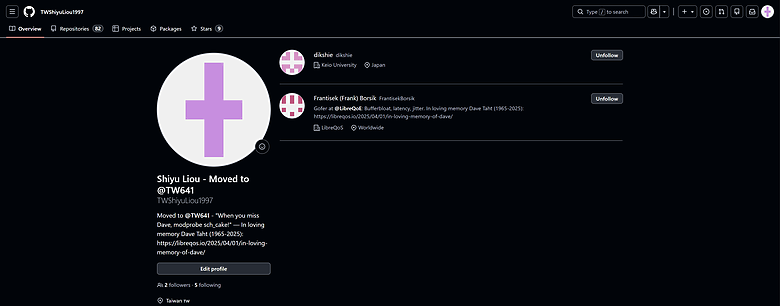
我的 GitHub 專案成功獲得了 LibreQoS 營運長 Frantisek (Frank) Borsik 的親自追蹤與肯定!Frank 來自捷克布拉格地區,在國際開源網路界大有來頭,曾負責知名開源路由器 Turris (OpenWrt) 以及 RF elements 的核心推廣。這代表本專案已經成功打入全球「對抗 Bufferbloat (緩衝膨脹)」社群的最核心圈!能與來自友好捷克的專家交流,真的是莫大的榮幸。

  • 🇹🇼🤝🇯🇵 來自日本的頂尖網路學者的跨國關注:
來自日本頂尖名校 慶應義塾大學 (Keio University) 的 Dikshie 博士 也親自給予此專案關注與認可!Dikshie 博士專攻 P2P 網路、網際網路架構與網路科學,能獲得這類精於底層網路基礎設施的重量級學者肯定,證明了這份演算法移植的技術含金量極高!
改善網路延遲!TW641 移植 CAKE (sch_cake) Padavan 路由器韌體:雲端編譯懶人包 (支援 142 款機型) (本專案已被 Bufferbloat.net 官方審查合併認證收錄)

[圖說:來自捷克 LibreQoS 營運長與日本慶應大學頂尖學者的親自追蹤認可]

  • 🇹🇼 總統級的數位國民外交:
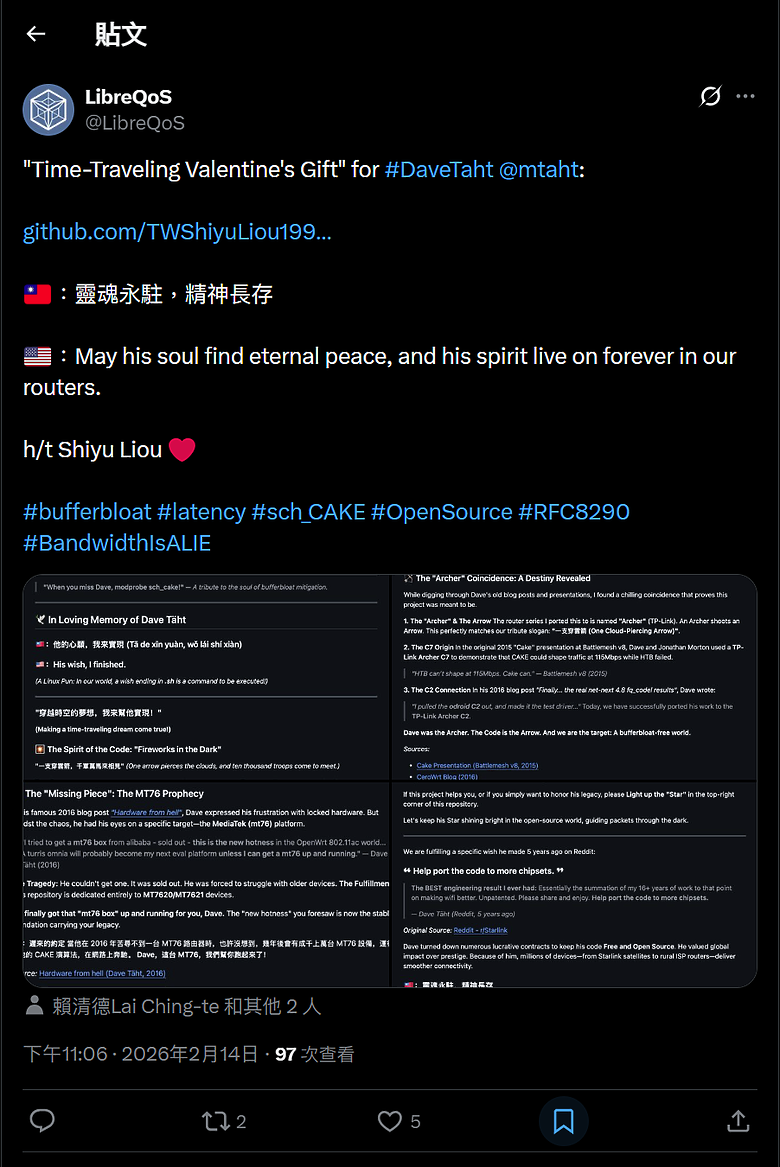
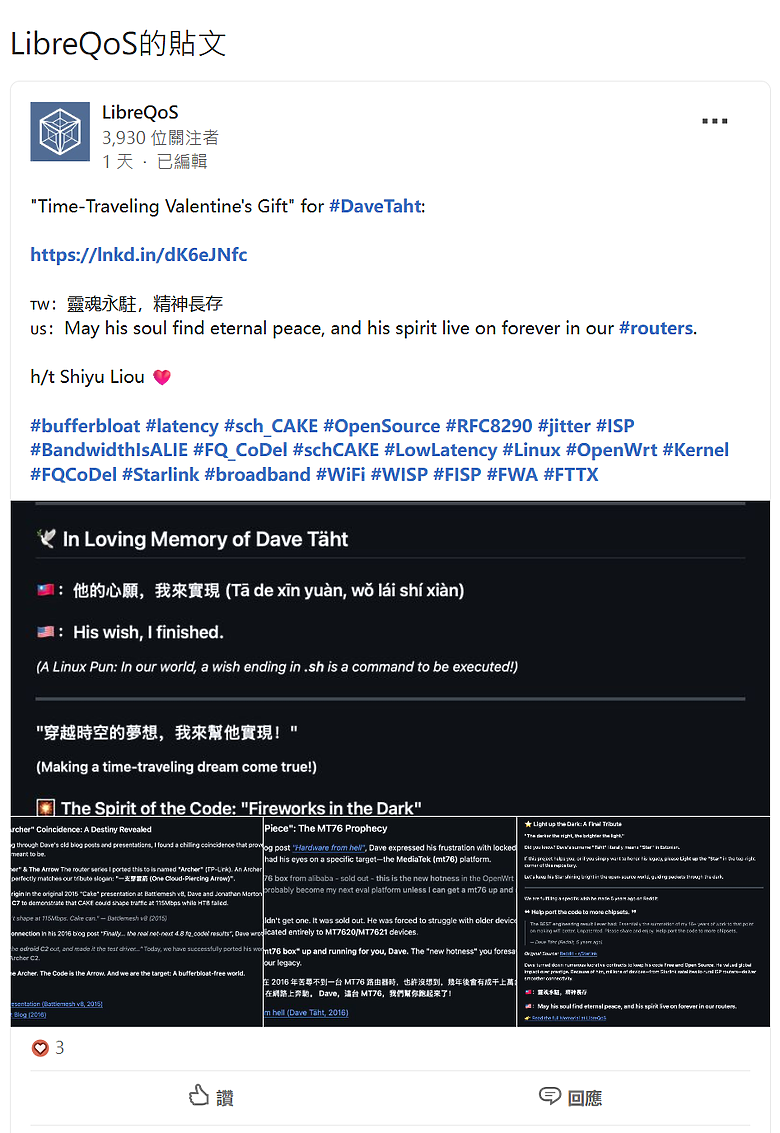
LibreQoS 官方甚至在 X (Twitter)、Facebook 與 LinkedIn 等國際社群平台上發布貼文致敬,將這個專案譽為給 Dave Täht 的 "Time-Traveling Valentine's Gift" (穿越時空的情人節禮物),並在文中史無前例地標註了台灣總統賴清德、前總統蔡英文與總統府發言人!能讓台灣的開源技術貢獻躍上國際版面,這真的是貨真價實的國民外交!🇹🇼

改善網路延遲!TW641 移植 CAKE (sch_cake) Padavan 路由器韌體:雲端編譯懶人包 (支援 142 款機型) (本專案已被 Bufferbloat.net 官方審查合併認證收錄)
[圖說:LibreQoS 官方於 Facebook、X 與 LinkedIn 三大平台同步發文致敬]

👇 需要大家的火力支援!讓世界看見台灣的貢獻!👇
如果你也為這份「數位國民外交」感到熱血沸騰,懇請花個 10 秒鐘,點選下方的 LibreQoS 官方社群貼文連結,幫忙 按讚、留言、分享!讓這份來自台灣的跨國界致敬傳遞給全世界:


🕊️ In Loving Memory of Dave Täht (紀念緩衝膨脹緩解之魂)
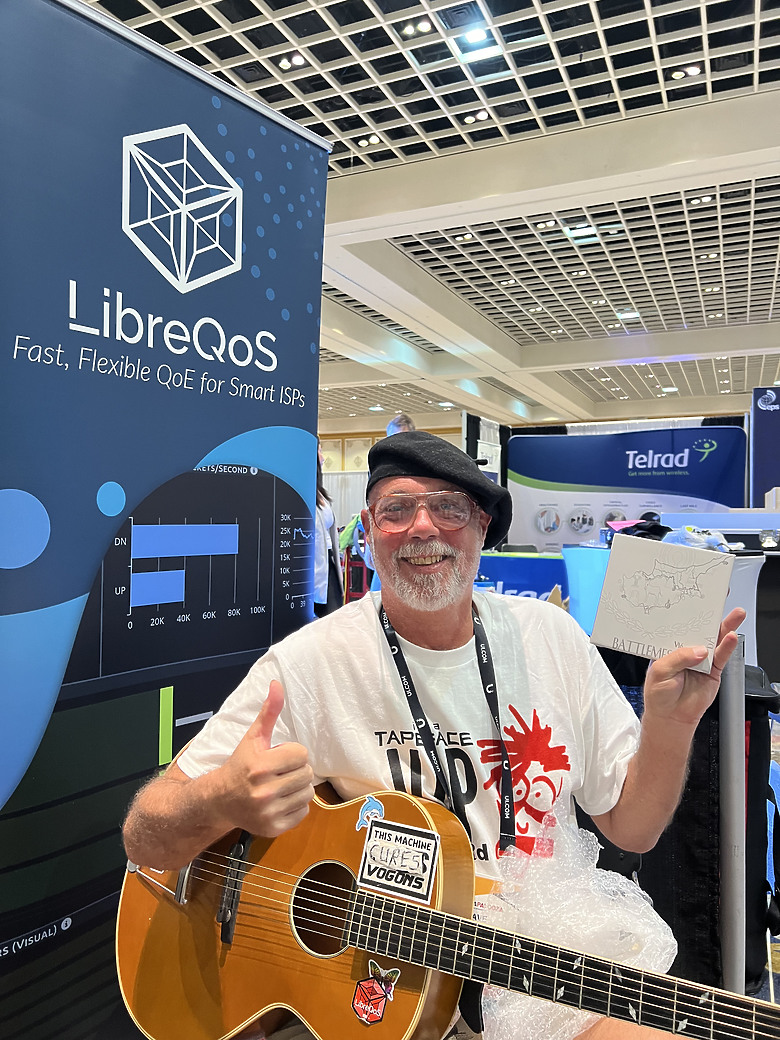

改善網路延遲!TW641 移植 CAKE (sch_cake) Padavan 路由器韌體:雲端編譯懶人包 (支援 142 款機型) (本專案已被 Bufferbloat.net 官方審查合併認證收錄)
[圖片來源: LibreQoS]

"When you miss Dave, modprobe sch_cake!"

A tribute to the soul of bufferbloat mitigation.

🇹🇼:他的心願,我來實現 (Tā de xīn yuàn, wǒ lái shí xiàn)


🇺🇸:His wish, I finished.


Dave Täht (1965–2025) 是一位偉大的網路技術開源貢獻者。他生前拒絕了無數高薪合約,只為了將他的程式碼保持免費與開源。因為他在 Bufferbloat (緩衝膨脹) 領域的研究,今天無數的設備才能享有順暢的網路。

🏹 穿越時空的巧合:Archer (弓箭手) 與 Arrow (箭)

有句成語說:「一支穿雲箭,千軍萬馬來相見」

Dave 就像是那支劃破網路壅塞黑夜的穿雲箭。巧合的是,當年他於 2015 年展示 CAKE 演算法時,使用的測試機是 TP-Link Archer C7;2016 年他用 odroid C2 做測試驅動。

今天,我成功將他的這項遺作移植到了 TP-Link Archer C2 身上。Dave 是那位弓箭手 (Archer),這段程式碼是那支箭 (Arrow),而我成功命中了目標:一個沒有 Bufferbloat 的美好世界。

🧩 遲來的約定:MT76 的預言

2016 年,Dave 曾在部落格寫下他苦尋不到一台基於 MediaTek (MT76) 的路由器,他預言這會是未來開源網路的新星。

幾年後的今天,我透過這個專案,讓成千上萬台 MT76 設備順利跑起了他撰寫的 CAKE 演算法。

"Dave,這台 MT76,我終於幫你跑起來了!"

🌟 點亮星星,讓愛延續

Dave 的姓氏 "Täht" 在愛沙尼亞語中正是「星星」的意思。如果您使用了我的韌體,請到 GitHub 開源專案紀念倉庫上幫我點亮那顆「Star」,延續 Dave Täht 的精神!

👉 開源移植程式碼與紀念倉庫:
https://github.com/TW641/sch_cake
👉 閱讀完整的 Dave Täht 紀念文章 (LibreQoS):
https://libreqos.io/2025/04/01/in-loving-memory-of-dave/


🔧 科普小教室|為什麼你的網路需要 CAKE?


CAKE 建立在 fq_codel 的成熟基礎上,是一種最先進的主動佇列管理 (AQM) 技術。借助 CAKE,大量傳輸不再中斷即時應用程式。即使家人在下載大檔案,你的線上遊戲依然能維持低 Ping 值✅。

🍰 為什麼叫 "CAKE" (蛋糕)?


這個名字源自電影《2010》與遊戲《Portal》,代表著「人人都有蛋糕吃」的美好願景。它實際上是 Common Applications Kept Enhanced 的縮寫。簡單來說,它能讓網路在多人使用時,依然人人有頻寬,順暢不卡頓。

⚙️ 快速看懂運作原理


改善網路延遲!TW641 移植 CAKE (sch_cake) Padavan 路由器韌體:雲端編譯懶人包 (支援 142 款機型) (本專案已被 Bufferbloat.net 官方審查合併認證收錄)
CAKE 最主要的目標是消除 Bufferbloat(緩衝膨脹)。

它的核心功能:
  • 流量整形 (Shaping): 限制進出頻寬,確保網路封包不會在數據機等節點堆積。
  • 公平排隊 (Fair Queuing): 確保每個裝置都能公平分配到頻寬,防止單一程式霸佔網路。
  • 自動化管理: 相比舊型的 QoS,CAKE 通常只需設定下載與上傳頻寬即可達到極佳效果。

⚠️ 注意: CAKE 比較消耗 CPU 效能。在硬體較弱的路由器上處理超過 350 Mbps 以上的頻寬時,可能會成為效能瓶頸。

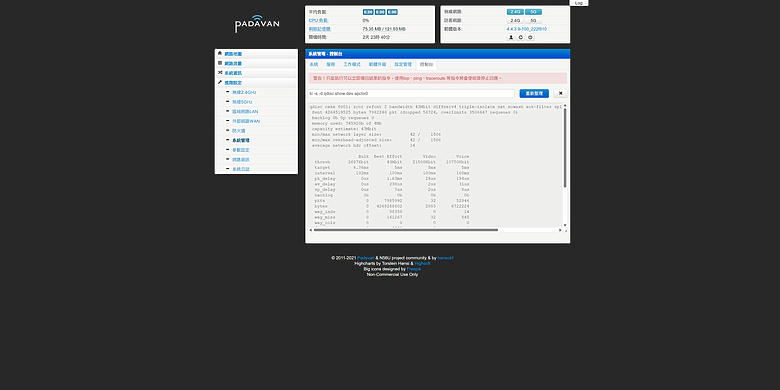
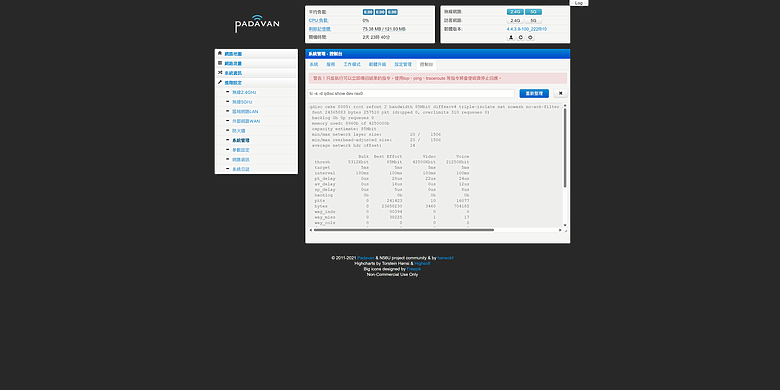
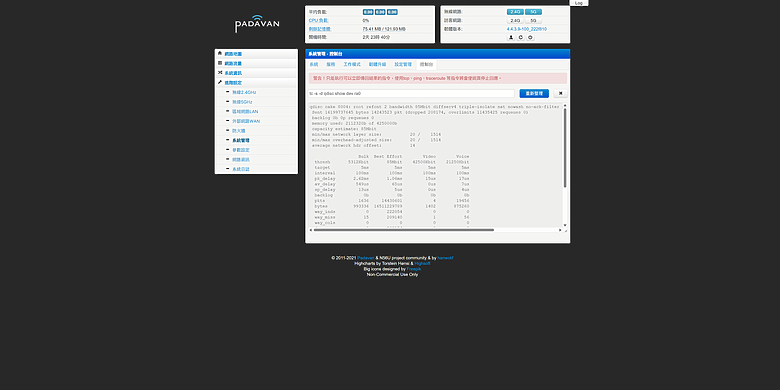
🔍 怎麼確認 CAKE 完美運行
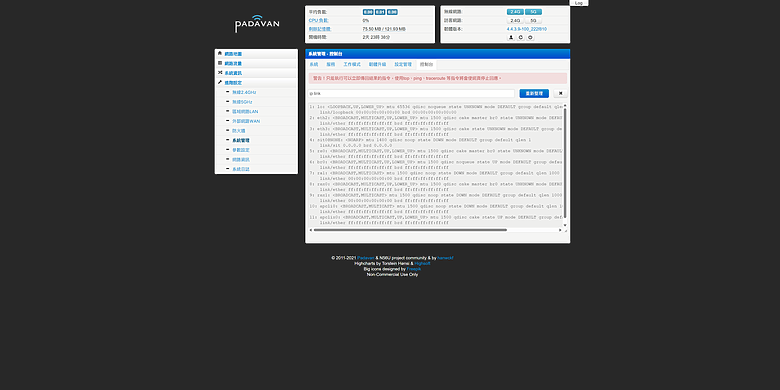

改善網路延遲!TW641 移植 CAKE (sch_cake) Padavan 路由器韌體:雲端編譯懶人包 (支援 142 款機型) (本專案已被 Bufferbloat.net 官方審查合併認證收錄)


🚀 Supported Device Matrix (精準支援 142 種機型選項清單)


請先在下方找到你的路由器品牌與商品名稱,括號 ( ) 內的就是稍後在 GitHub 編譯選單中需要輸入的「選項代碼」

🟢 Kernel 3.4 經典老爺機 (共 125 種選項)


品牌 (A-Z) 支援型號:商品名稱 (選項代碼)
5K 5K-W20 (5K-W20)
A5 A5-V11 16M (A5-V11_16M), A5-V11 4M (A5-V11_4M), A5-V11 8M (A5-V11_8M)
ATEL ALR-U270 (ALR-U270)
ASUS (華碩) RP-AC56 (RP-AC56), RT-AC1200 (RT-AC1200), RT-AC1200GU (RT-AC1200GU), RT-AC1200HP (RT-AC1200HP), RT-AC51U (RT-AC51U), RT-AC54U (RT-AC54U), RT-N10 C1 (RT-N10C1), RT-N11P (RT-N11P), RT-N11P B1 (RT-N11PB1), RT-N12+ (RT-N12plus), RT-N13U B1 (RT-N13UB1), RT-N14U (RT-N14U), RT-N56U (RT-N56U), RT-N56U GE2 (RT-N56U-GE2), RT-N56U B1 (RT-N56UB1)
BELKIN F9K1103 (F9K1103)
D-Link (友訊) DIR-300 B1 (DIR-300B1), DIR-300 B7 (DIR-300B7), DIR-320 B1 (DIR-320B1), DIR-620 A1 (DIR-620A1), DIR-620 D1 (DIR-620D1), DIR-860L (DIR-860L), DIR-882 (DIR-882)
GL.iNet GL-MT300A (GL-MT300A), GL-MT300N (GL-MT300N), GL-MT300N V2 (GL-MT300NV2)
HiWiFi (极路由) HC5661A (HC5661A)
Kroks KNDRT31R26 (KNDRT31R26), KNDRT31R3 (KNDRT31R3)
Linksys EA-8100 (EA-8100)
MQMaker WiTi 256M (MQ-WITI-256), WiTi 512M (MQ-WITI-512)
Newifi (新路由) Newifi D1 (NEWIFI-D1), Newifi D2 (NEWIFI-D2), Newifi Mini (NEWIFI-MINI), Newifi Y1S (NEWIFI-Y1S)
Nexx WT3020A (WT3020A), WT3020H (WT3020H), WT3020H 16M (WT3020H16M)
Phicomm (斐讯) PSG1218 256M (256PSG1218), PSG1218 (PSG1218)
Samsung (三星) SWR1100 (SWR1100)
Sercomm RT-S1010 (RT-S1010), Smartbox SPI (SMARTBOX_SPI), SMBX Pro NAND (SMBXPRONAND), SMBX Turbo (SMBXTURBO)
SNR SNR-MD1 (SNR-MD1), SNR-ME1 (SNR-ME1), SNR-W4N-M (SNR-W4N-M), SNR-W4N-M USB (SNR-W4N-M_USB)
Totolink A3004NS (A3004NS)
TP-Link Archer C2 V1 (TL_C2-V1), Archer C20 V1 (TL_C20-V1), Archer C20 V1 16M (TL_C20-V1_16M), Archer C20 V4 (TL_C20-V4), Archer C20 V5 (TL_C20-V5), Archer C5 V4 (TL_C5-V4), Archer C50 V1 (TL_C50-V1), Archer C50 V3 (TL_C50-V3), Archer C50 V4 (TL_C50-V4), EC220-G5 V2 (TL_EC220_G5-V2), MR200 V1 (TL_MR200-V1), MR3020 V3 (TL_MR3020-V3), MR3420 V5 (TL_MR3420-V5), WDR7300 V5 (TL_WDR7300-V5), WR840N V4 (TL_WR840N-V4), WR840N V4 USB (TL_WR840N-V4_USB), WR840N V5 (TL_WR840N-V5), WR840N V5 RU (TL_WR840N-V5_RU), WR840N V6 (TL_WR840N-V6), WR841N V13 (TL_WR841N-V13), WR841N V13 USB (TL_WR841N-V13_USB), WR841N V14 (TL_WR841N-V14), WR841N V14 8M (TL_WR841N-V14_8M), WR842N V5 (TL_WR842N-V5), WR845N V3 (TL_WR845N-V3), WR845N V4 (TL_WR845N-V4)
Tuoshi TS7620N (TS7620N)
Ubiquiti EdgeRouter X (UBNT-ERX)
Unielec U7621-06 (U7621-06)
Wall-AP Wall-AP (WALL-AP)
Xiaomi (小米/红米) Mi Router 3 (MI-3), Mi Router 3 SPI (MI-3_SPI), Mi Router 3C (MI-3C), Mi Router 3G (MI-R3G), Mi Router 3G SPI (MI-R3G_SPI), Mi Router 3G v2 (MI-R3Gv2), Mi Router 3 Pro (MI-R3PRO), Mi Router 3P SPI (MI-R3P_SPI), Mi Router 4 (MI-4), Mi Router 4A 100M (MI-4A_100M), Mi Router 4C (MI-4C), Mi Router Mini (MI-MINI), Mi Router Nano (MI-NANO), Xiaomi Router 2100 (R2100), Redmi Router AC2100 (RM-AC2100)
Youhua (友华) WR1200JS (WR1200JS)
Youku (优酷) YK-L1 (YK-L1), YK-L1C (YK-L1C)
ZBT WE1326 (ZBT-WE1326), WE1626 (ZBT-WE1626), WE826-T2 (ZBT-WE826T2), WG3526 (ZBT-WG3526), WG3526-32 (ZBT-WG3526-32), WR8305RT (ZBT-WR8305RT)
ZTE (中兴) E8820S (ZTE_E8820S)
ZyXEL (合勤/Keenetic) KN-4G3 (KN-4G3), KN-4G3B (KN-4G3B), KN-EXTRA (KN-EXTRA), KN-EXTRA2 (KN-EXTRA2), KN-GIGA3 (KN-GIGA3), KN-LITE (KN-LITE), KN-LITE2 (KN-LITE2), KN-LITE3 (KN-LITE3), KN-LITE3B (KN-LITE3B), KN-OMNI (KN-OMNI), KN-OMNI2 (KN-OMNI2), KN-START2 (KN-START2), KN-ULTRA2 (KN-ULTRA2), KN-VIVA (KN-VIVA)


🔵 Kernel 4.4 進階機型 (共 17 種選項)


品牌 (A-Z) 支援型號:商品名稱 (選項代碼)
D-Link (友訊) DIR-878 (DIR-878), DIR-882 (DIR-882)
JCG (捷稀) 836PRO (JCG-836PRO), AC860M (JCG-AC860M), Q20 (JCG-Q20), Y2 (JCG-Y2)
Motorola (摩托羅拉) MR2600 (MR2600)
Netgear (網件) BZV (NETGEAR-BZV)
Newifi (新路由) Newifi 3 (NEWIFI3)
Phicomm (斐讯) K2P (K2P), K2P Nano (K2P-NANO), K2P USB (K2P-USB)
Xiaomi (小米/红米) CR660x (CR660x), Mi Router 3G (MI-R3G), Mi Router 3 Pro (MI-R3P), Redmi Router 2100 (RM2100)
XiaoYu (小渔) XY-C1 (XY-C1)


🌐 支援 14 種多國語言


我相信網路無國界,現在韌體編譯環境已支援 14 種語言:
  • English_Only (預設英文)
  • CN - 繁體中文 (臺灣用語),請在選單填入 CN 即可獲得。
  • 另外包含:俄語 (RU), 捷克語 (CZ), 德語 (DE), 法語 (FR) 等共 14 國語言。


🍰 A PIECE OF CAKE!超簡單、超輕鬆的雲端編譯法 (免架環境,5分鐘搞定!)


這真的是 Piece of cake!我已經把所有設定都寫進 GitHub Actions 裡了。你完全不需要會寫程式,只要會點選滑鼠,幾分鐘就能得到專屬你的韌體檔!

👉 簡單 6 步驟:


Step 1:註冊登入 GitHub 並點亮「星星」🌟 (紀念 Dave Täht)

前往 GitHub 註冊一個免費帳號並登入。請前往專案紀念倉庫,順手點選右上角的 「Star ⭐」 向 Dave 致敬!

👉 https://github.com/TW641/sch_cake

Step 2:選擇你的路由器機型並 Fork 專案

根據你剛剛在上方表格找到的代號,進入對應連結後,點選右上角的 「Fork」 按鈕:

🟢 經典老機 (核心 3.4) 👉 點我前往

🔵 進階機型 (核心 4.4) 👉 點我前往

Step 3:啟用 Actions 功能

進入你剛 Fork 的專案,點選上方選單的 「Actions」,並點選綠色按鈕 「I understand my workflows, go ahead and enable them」 啟用它。

Step 4:選擇正確的 Workflow

在 Actions 頁面左側,根據機型點選對應的流程名稱:

🟢 3.4 機型: Build firmware (Ultimate Fix - Early Size Check)

🔵 4.4 機型: Custom-Router-Build-Final-Fix

Step 5:一鍵開始編譯與自訂參數 (IP/密碼)

點選畫面右邊的 「Run workflow」 下拉選單。

【最重要的一步】Target Model 欄位中輸入你的「路由器選項代碼」(需與表格括號內一模一樣);語言選單請填入 CN (即代表繁體中文,臺灣用語)。

自訂設定 (Customization):你可以在 JSON 欄位中直接修改預設 IP 與密碼,若不修改,將使用預設值。最後點選綠色的 「Run workflow」 按鈕即可!

Step 6:下載與刷機

等待約 10~15 分鐘,流程亮起綠色打勾圖示 ✅ 後,點選進去該次流程,拉到最下方找到 「Artifacts」 下載壓縮檔,裡面的 .bin 檔案就是你的專屬韌體!
https://TW641.github.io/ https://github.com/TW641
TW641 | Padavan CAKE OpenWrt 25.12 Dave's Guitar 開源路由器韌體 與 Dave Täht 數位典藏博物館

【博物館首頁】Dave Täht 數位典藏博物館 (官方主站 - GitHub Pages):
https://tw641.github.io/

【音樂祭特別企劃】Dave's Guitar: Thank You Music Festival 2026:
(「謝謝」星空音樂祭 | Dedicated to Dave Täht & Every Unsung Hero in the World — and You.)
https://tw641.github.io/daves-guitar-2026/

【開源專案說明書】Padavan-CAKE 雲端編譯懶人包:
https://tw641.github.io/Padavan-CAKE/

[台灣 x 丹麥 x 瑞典] 國際最高權威 Bufferbloat.net 官方收錄與 Toke 博士親自修改:

Bufferbloat.net 全球官方認證名單:What Can I Do About Bufferbloat?
https://www.bufferbloat.net/projects/bloat/wiki/What_can_I_do_about_Bufferbloat/

官方審查合併紀錄 (PR #94):
https://github.com/tohojo/bufferbloat-net/pull/94

Toke 博士親自修正排版紀錄 (Commit c5961c7):
https://github.com/tohojo/bufferbloat-net/commit/c5961c7d341974c65b7d8749c80c5bc7e9e2bc92

【全球極速備援站】十全十美:10 大官方主站及鏡像備援網站
官方首頁在 Google PageSpeed Insights 針對極端環境的模擬測速中,
【效能、無障礙功能、最佳做法、SEO】四項指標皆達 100 滿分!
若主站無法連線,請使用以下分流節點 (皆支援直接加上
/daves-guitar-2026/ 或 /Padavan-CAKE/ 進入專屬子頁面):

1. Dave Täht 數位典藏博物館 (官方主站 - 託管於微軟 GitHub,絕對安全):
https://tw641.github.io/

2. Cloudflare Pages (臺灣 TPE 網路 - 全球最大 CDN 服務商,臺灣在地機房):
https://tw641.pages.dev/

3. Cloudflare Workers (全球邊緣網路 - 運用 Cloudflare 全球節點分散流量):
https://www.tw641.workers.dev/

4. Firebase Hosting (Google 官方全球 CDN - 由 Google 企業級基礎設施提供):
https://tw641t.web.app/

5. FirebaseApp (Google 備用網域 - 同樣隸屬 Google 官方防護網域):
https://tw641t.firebaseapp.com/

6. GitLab Pages (官方鏡像備援 - 託管於全球知名開源程式碼平台 GitLab):
https://tw641.gitlab.io/

7. Netlify (全球 CDN 網路 - 國際知名靜態網站託管服務商,連線穩定):
https://tw641.netlify.app/

8. Vercel (全球邊緣網路 - 知名開源框架原廠提供之企業級雲端服務):
https://tw641.vercel.app/

9. Render (雲端後端備援 - 知名矽谷新創雲端平台託管):
https://tw641.onrender.com/

10. Surge (隱藏版影子節點 / 跨歐美亞澳異質多雲備援):
(底層調用: DigitalOcean 全球機房 + Linode 東京機房 + Vultr 雪梨機房)
https://tw641.surge.sh/

繁體中文版本,請見:https://www.mobile01.com/topicdetail.php?f=110&t=7231531#92875605

🏆 🇹🇼 World Premiere! Taiwan No.1! 🇹🇼


🚀 Improve Network Latency! TW641 Ported CAKE (sch_cake) Padavan Router Firmware: Cloud Compilation Guide (Supports 142 Models)

 
👉 Previous Firmware Release, Test Results & Flashing Guide: 
[Firmware Release] [Padavan + CAKE Port] TP-Link Archer C2 V1 (with 3.4.113 Linux Kernel) & Phicomm K2P A1/A2 (with 4.4.198 Linux Kernel)
https://www.mobile01.com/topicdetail.php?f=110&t=7220226

This is my independent project and the world's first successful port of the CAKE traffic control algorithm to Padavan (including both Linux Kernel 3.4.113 and Linux Kernel 4.4.198)!
 
Not only have I resurrected the classic TP-Link Archer C2 and Phicomm K2P, but I have also significantly expanded the supported device list. This project accurately supports 142 router models at once, with up to 14 multi-language packs available!
 

📌 Firmware Features Overview

 
  • Kernel Breakthrough: Provides dual versions of Linux Kernel 3.4.113 and 4.4.198, significantly ahead of the original old kernels.
  • Performance Unleashed: Fully integrated CAKE traffic scheduling, HWNAT (Hardware Acceleration) + SFE (Software Acceleration).
  • UI Optimization: Built-in multi-language support, with layout optimized for 1080P widescreen.
  • Stability Boost: Fixed MT7610E wireless disconnect issues, enabled fast reconnection; the 4.4 version uses the most stable Iptables 1.8.7 and libmnl 1.0.5 combo.
  • Security Enhancements: Fully upgraded Busybox to 1.37.0, fixing multiple high-risk CVE vulnerabilities.


(Note: My previous older projects were hosted under my old account TWShiyuLiou1997. Now, all successful builds are centralized in the new TW641 account. Please refer to the new repository's Actions! If you find this project helpful, please click the link below to Follow my GitHub account for support and encouragement!)
👉 My New GitHub Profile (TW641): https://github.com/TW641
👉 My Old GitHub Profile (TWShiyuLiou1997): https://github.com/TWShiyuLiou1997


🌍 Recognition from the Global Open Source Community & Presidential Level! (True Digital Diplomacy)

 
This project was not only successfully released on Taiwanese forums but also caused a huge response in the international open-source community, which is a massive validation and surprise for me as a solo developer:
  • 🇹🇼🤝🇨🇿 Endorsed by Czech Open Source Expert:
    My GitHub project successfully gained the attention and approval of Frantisek (Frank) Borsik, COO of LibreQoS! Frank, from Prague, Czech Republic, is a prominent figure in the global open-source networking community, having previously promoted the core of the well-known open-source router Turris (OpenWrt) and RF elements. This means this project has successfully broken into the core circle of the global "Anti-Bufferbloat" community! It's an immense honor to interact with experts from the friendly Czech Republic.

  • 🇹🇼🤝🇯🇵 Cross-Border Attention from Top Japanese Network Scholar:
    Dr. Dikshie from Keio University, a top university in Japan, also paid attention to and endorsed this project! Dr. Dikshie specializes in P2P networks, internet architecture, and network science. Receiving such recognition from a heavyweight scholar who excels in underlying network infrastructure proves that the technical value of this algorithm porting is extremely high!

 
[Image: Personal tracking and endorsement from LibreQoS COO and a top scholar from Keio University]

  • 🇹🇼 Presidential-level Digital Diplomacy:
    LibreQoS officially published a tribute post on international social platforms like X (Twitter), Facebook, and LinkedIn, praising this project as a "Time-Traveling Valentine's Gift" for Dave Täht, and unprecedentedly tagged the President of Taiwan, Lai Ching-te, former President Tsai Ing-wen, and the Presidential Office Spokesperson! Bringing Taiwan's open-source technical contributions to the international stage is true citizen diplomacy in action! 🇹🇼


[Image: LibreQoS official tribute posts across Facebook, X, and LinkedIn]

👇 Need Your Support! Let the World See Taiwan's Contribution! 👇
If you also feel passionate about this "digital diplomacy," please take 10 seconds to click the official LibreQoS social post links below to Like, Comment, and Share! Let this transnational tribute from Taiwan be spread to the whole world:
 

🕊️ In Loving Memory of Dave Täht (The Soul of Bufferbloat Mitigation)


[Image Source: LibreQoS]


"When you miss Dave, modprobe sch_cake!"

A tribute to the soul of bufferbloat mitigation.
 

🇹🇼: 他的心願,我來實現 (Tā de xīn yuàn, wǒ lái shí xiàn)


🇺🇸: His wish, I finished.


Dave Täht (1965–2025) was a great open-source contributor in network technology. He turned down countless high-paying contracts just to keep his code free and open-source. Because of his research in the Bufferbloat field, countless devices today enjoy smooth networking.

🏹 A Coincidence Across Time: Archer and Arrow

There is a Chinese idiom: "A single arrow pierces the clouds, and thousands of troops come to meet."
 
Dave is like that cloud-piercing arrow tearing through the dark night of network congestion. Coincidentally, when he demonstrated the CAKE algorithm in 2015, the test device he used was the TP-Link Archer C7; in 2016, he used an odroid C2 to test the driver.
 
Today, I successfully ported his final legacy to the TP-Link Archer C2. Dave is the Archer, this code is the Arrow, and I successfully hit the target: a beautiful world without Bufferbloat.

🧩 A Belated Promise: The MT76 Prophecy

In 2016, Dave wrote on his blog that he struggled to find a MediaTek (MT76) based router, predicting it would be the rising star of open-source networking.
 
Years later, through this project, I've enabled thousands of MT76 devices to smoothly run the CAKE algorithm he wrote.
 
"Dave, I finally got this MT76 running for you!"

🌟 Light a Star, Let the Love Continue
 
Dave's surname "Täht" means "Star" in Estonian. If you use my firmware, please go to the GitHub open-source memorial repository and light up that "Star" for me to continue Dave Täht's spirit!
 
👉 Open Source Port Code & Memorial Repository: 
https://github.com/TW641/sch_cake
👉 Read the full memorial article for Dave Täht (LibreQoS): 
https://libreqos.io/2025/04/01/in-loving-memory-of-dave/


🔧 Tech 101 | Why Does Your Network Need CAKE?

 
Built on the mature foundation of fq_codel, CAKE is a state-of-the-art Active Queue Management (AQM) technology. With CAKE, heavy bulk transfers no longer interrupt real-time applications. Even if your family is downloading large files, your online games will still maintain a low Ping✅.

🍰 Why is it called "CAKE"?

 
The name originates from the movie "2010" and the game "Portal", representing the beautiful vision that everyone gets a piece of the cake. It actually stands for Common Applications Kept Enhanced. Simply put, it ensures that when multiple people use the network, everyone still gets bandwidth, keeping things smooth and stutter-free.

⚙️ Quick Guide to How It Works


CAKE's primary goal is to eliminate Bufferbloat.

Its Core Features:
  • Traffic Shaping: Limits ingress and egress bandwidth to ensure network packets don't pile up in nodes like modems.
  • Fair Queuing: Ensures every device gets a fair share of bandwidth, preventing a single application from hogging the network.
  • Automated Management: Compared to older QoS, CAKE usually only requires setting the download and upload bandwidth limits to achieve excellent results.
 
⚠️ Note: CAKE is relatively CPU-intensive. It may become a performance bottleneck on weaker routers when handling bandwidths over 350 Mbps.

🔍 How to Verify CAKE is Running Perfectly


🚀 Supported Device Matrix (Accurately Supports 142 Models)


Please find your router brand and model name below. The text inside the brackets ( ) is the "Option Code" you will need to input in the GitHub compilation menu later!

🟢 Kernel 3.4 Classic Devices (125 Options)


Brand (A-Z) Supported Model: Product Name (Option Code)
5K 5K-W20 (5K-W20)
A5 A5-V11 16M (A5-V11_16M), A5-V11 4M (A5-V11_4M), A5-V11 8M (A5-V11_8M)
ATEL ALR-U270 (ALR-U270)
ASUS RP-AC56 (RP-AC56), RT-AC1200 (RT-AC1200), RT-AC1200GU (RT-AC1200GU), RT-AC1200HP (RT-AC1200HP), RT-AC51U (RT-AC51U), RT-AC54U (RT-AC54U), RT-N10 C1 (RT-N10C1), RT-N11P (RT-N11P), RT-N11P B1 (RT-N11PB1), RT-N12+ (RT-N12plus), RT-N13U B1 (RT-N13UB1), RT-N14U (RT-N14U), RT-N56U (RT-N56U), RT-N56U GE2 (RT-N56U-GE2), RT-N56U B1 (RT-N56UB1)
BELKIN F9K1103 (F9K1103)
D-Link DIR-300 B1 (DIR-300B1), DIR-300 B7 (DIR-300B7), DIR-320 B1 (DIR-320B1), DIR-620 A1 (DIR-620A1), DIR-620 D1 (DIR-620D1), DIR-860L (DIR-860L), DIR-882 (DIR-882)
GL.iNet GL-MT300A (GL-MT300A), GL-MT300N (GL-MT300N), GL-MT300N V2 (GL-MT300NV2)
HiWiFi HC5661A (HC5661A)
Kroks KNDRT31R26 (KNDRT31R26), KNDRT31R3 (KNDRT31R3)
Linksys EA-8100 (EA-8100)
MQMaker WiTi 256M (MQ-WITI-256), WiTi 512M (MQ-WITI-512)
Newifi Newifi D1 (NEWIFI-D1), Newifi D2 (NEWIFI-D2), Newifi Mini (NEWIFI-MINI), Newifi Y1S (NEWIFI-Y1S)
Nexx WT3020A (WT3020A), WT3020H (WT3020H), WT3020H 16M (WT3020H16M)
Phicomm PSG1218 256M (256PSG1218), PSG1218 (PSG1218)
Samsung SWR1100 (SWR1100)
Sercomm RT-S1010 (RT-S1010), Smartbox SPI (SMARTBOX_SPI), SMBX Pro NAND (SMBXPRONAND), SMBX Turbo (SMBXTURBO)
SNR SNR-MD1 (SNR-MD1), SNR-ME1 (SNR-ME1), SNR-W4N-M (SNR-W4N-M), SNR-W4N-M USB (SNR-W4N-M_USB)
Totolink A3004NS (A3004NS)
TP-Link Archer C2 V1 (TL_C2-V1), Archer C20 V1 (TL_C20-V1), Archer C20 V1 16M (TL_C20-V1_16M), Archer C20 V4 (TL_C20-V4), Archer C20 V5 (TL_C20-V5), Archer C5 V4 (TL_C5-V4), Archer C50 V1 (TL_C50-V1), Archer C50 V3 (TL_C50-V3), Archer C50 V4 (TL_C50-V4), EC220-G5 V2 (TL_EC220_G5-V2), MR200 V1 (TL_MR200-V1), MR3020 V3 (TL_MR3020-V3), MR3420 V5 (TL_MR3420-V5), WDR7300 V5 (TL_WDR7300-V5), WR840N V4 (TL_WR840N-V4), WR840N V4 USB (TL_WR840N-V4_USB), WR840N V5 (TL_WR840N-V5), WR840N V5 RU (TL_WR840N-V5_RU), WR840N V6 (TL_WR840N-V6), WR841N V13 (TL_WR841N-V13), WR841N V13 USB (TL_WR841N-V13_USB), WR841N V14 (TL_WR841N-V14), WR841N V14 8M (TL_WR841N-V14_8M), WR842N V5 (TL_WR842N-V5), WR845N V3 (TL_WR845N-V3), WR845N V4 (TL_WR845N-V4)
Tuoshi TS7620N (TS7620N)
Ubiquiti EdgeRouter X (UBNT-ERX)
Unielec U7621-06 (U7621-06)
Wall-AP Wall-AP (WALL-AP)
Xiaomi / Redmi Mi Router 3 (MI-3), Mi Router 3 SPI (MI-3_SPI), Mi Router 3C (MI-3C), Mi Router 3G (MI-R3G), Mi Router 3G SPI (MI-R3G_SPI), Mi Router 3G v2 (MI-R3Gv2), Mi Router 3 Pro (MI-R3PRO), Mi Router 3P SPI (MI-R3P_SPI), Mi Router 4 (MI-4), Mi Router 4A 100M (MI-4A_100M), Mi Router 4C (MI-4C), Mi Router Mini (MI-MINI), Mi Router Nano (MI-NANO), Xiaomi Router 2100 (R2100), Redmi Router AC2100 (RM-AC2100)
Youhua WR1200JS (WR1200JS)
Youku YK-L1 (YK-L1), YK-L1C (YK-L1C)
ZBT WE1326 (ZBT-WE1326), WE1626 (ZBT-WE1626), WE826-T2 (ZBT-WE826T2), WG3526 (ZBT-WG3526), WG3526-32 (ZBT-WG3526-32), WR8305RT (ZBT-WR8305RT)
ZTE E8820S (ZTE_E8820S)
ZyXEL / Keenetic KN-4G3 (KN-4G3), KN-4G3B (KN-4G3B), KN-EXTRA (KN-EXTRA), KN-EXTRA2 (KN-EXTRA2), KN-GIGA3 (KN-GIGA3), KN-LITE (KN-LITE), KN-LITE2 (KN-LITE2), KN-LITE3 (KN-LITE3), KN-LITE3B (KN-LITE3B), KN-OMNI (KN-OMNI), KN-OMNI2 (KN-OMNI2), KN-START2 (KN-START2), KN-ULTRA2 (KN-ULTRA2), KN-VIVA (KN-VIVA)
 

🔵 Kernel 4.4 Advanced Devices (17 Options)


Brand (A-Z) Supported Model: Product Name (Option Code)
D-Link DIR-878 (DIR-878), DIR-882 (DIR-882)
JCG 836PRO (JCG-836PRO), AC860M (JCG-AC860M), Q20 (JCG-Q20), Y2 (JCG-Y2)
Motorola MR2600 (MR2600)
Netgear BZV (NETGEAR-BZV)
Newifi Newifi 3 (NEWIFI3)
Phicomm K2P (K2P), K2P Nano (K2P-NANO), K2P USB (K2P-USB)
Xiaomi / Redmi CR660x (CR660x), Mi Router 3G (MI-R3G), Mi Router 3 Pro (MI-R3P), Redmi Router 2100 (RM2100)
XiaoYu XY-C1 (XY-C1)


🌐 Supports 14 Languages

 
I believe the internet has no borders. The firmware build environment now supports 14 languages:
  • English_Only (Default)
  • CN - Traditional Chinese (Taiwan), simply enter CN in the menu to get it.
  • Also includes: Russian (RU), Czech (CZ), German (DE), French (FR), totaling 14 languages.


🍰 A PIECE OF CAKE! Super Easy Cloud Compilation (No Local Environment Needed, Done in 5 Mins!)

 
It's truly a piece of cake! I have integrated all settings into GitHub Actions. You don't need to know how to code at all. Just click your mouse, and you'll get your customized firmware in minutes!

👉 6 Simple Steps:


Step 1: Register/Log in to GitHub and Light a "Star" 🌟 (In Memory of Dave Täht)
 
Go to GitHub to register a free account and log in. Please visit the memorial repository and click the "Star ⭐" in the top right corner to pay tribute to Dave!
 
👉 https://github.com/TW641/sch_cake

Step 2: Select Your Router Model and Fork the Project
 
Based on the code you found in the table above, enter the corresponding link and click the "Fork" button in the top right corner:
 
🟢 Classic Devices (Kernel 3.4) 👉 Click Here
 
🔵 Advanced Devices (Kernel 4.4) 👉 Click Here

Step 3: Enable Actions
 
Go to your Forked project, click the "Actions" tab at the top, and click the green button "I understand my workflows, go ahead and enable them".

Step 4: Select the Correct Workflow
 
On the left side of the Actions page, click the corresponding workflow name based on your model:
 
🟢 3.4 Models: Build firmware (Ultimate Fix - Early Size Check)
 
🔵 4.4 Models: Custom-Router-Build-Final-Fix

Step 5: One-Click Compile & Customize (IP/Password)
 
Click the "Run workflow" dropdown menu on the right.
 
[Most Important Step] Enter your "Option Code" in the Target Model field (must perfectly match the one in the brackets from the table); for the language menu, enter English_Only (or CN if you prefer Traditional Chinese).
 
Customization: You can directly modify the default IP and password in the JSON field. If untouched, default values will be used. Finally, click the green "Run workflow" button!

Step 6: Download & Flash
 
Wait for about 10-15 minutes. Once the workflow shows a green checkmark ✅, click into the run, scroll to the bottom, and find "Artifacts" to download the ZIP file. The .bin file inside is your exclusive firmware!
https://TW641.github.io/ https://github.com/TW641
文章分享
評分
評分
複製連結

今日熱門文章 網友點擊推薦!