Debian on Apple silicon - UTM? or VMWare Fusion Pro? or Virtual Box?

cdma2k wrote:
我的使用 mac with virtualized debian guest 是 server, another debian machine 是 client


那 client 可用 Remmina
==
sudo apt update
sudo apt install remmina remmina-plugin-rdp
cruiseton wrote:
那 client 可...(恕刪)

I guess you miss the points
1. 用 vnc 連結, 可是mac os 和 linux vnc viewer, 無法clipboard sharing 無法copy and paste
2. 因為 headless, vnc viewer resolution 限制在 HD, 無法更高, 買了一個 dummy 4K HDMI, 可以1k 2K 4K, 可是沒有 3440x1440 支援 3440x1440的 夭壽貴
cdma2k wrote:I guess you...(恕刪)


我知道你在說啥. 1. 不接 monitor, 只接 較便宜dummy adapter 無法用 3440x1440 的問題無解, 就只能多花錢. Mac mini 的錢都花了

Amazon 加運費不知是否會比較便宜?
https://www.amazon.com/FUERAN-HDMI-Dummy-Plug-Cryptocurrency/dp/B0FV4YZYDK

2. VNC 既然不行 copy/paste, 為何不換其他試試? 還是你只想表達的是只要 vnc 不能 copy/paste, 就代表換其他 APP 也不能 copy/paste?

==

Well, for UTM

The standard QEMU VNC console in UTM does not support clipboard sharing.

Instead of VNC, UTM uses the SPICE protocol for clipboard sharing, which is the recommended method for both QEMU and Apple virtualization backends.

How to Enable Clipboard Sharing
To use copy/paste functionality within a UTM virtual machine, you must use the built-in "Clipboard Sharing" feature and install the appropriate guest tools:

Enable the Feature in UTM Settings:
  • In the virtual machine's configuration, navigate to the Sharing section.
  • Ensure that the "Clipboard sharing" option is enabled.


Install Guest Tools:
The guest operating system requires specific tools (agents) to communicate with the host's clipboard.
  • Linux Guests: You typically need to install spice-vdagent (e.g., sudo apt install spice-vdagent on Debian/Ubuntu-based systems).
  • Windows Guests: Run the SPICE guest tools installer within the Windows VM.
  • macOS Guests: For guests and hosts both running recent macOS versions (e.g., macOS 15 or higher), you can install the macOS guest tools via the "Install Guest Tools" option in the UTM toolbar.


Permissions and Restart:
  • After installation, you may need to grant accessibility/clipboard permissions in the guest OS settings.
  • Reboot the virtual machine for the changes to take effect.

Alternative for macOS Guests

If you are running a macOS guest, you can also enable the built-in "Screen Sharing" feature within the guest OS's System Settings and then connect to the VM's displayed VNC address from your host Mac's Finder or Spotlight search. This method uses Apple's native VNC client, which supports clipboard sharing between two Macs.
[]
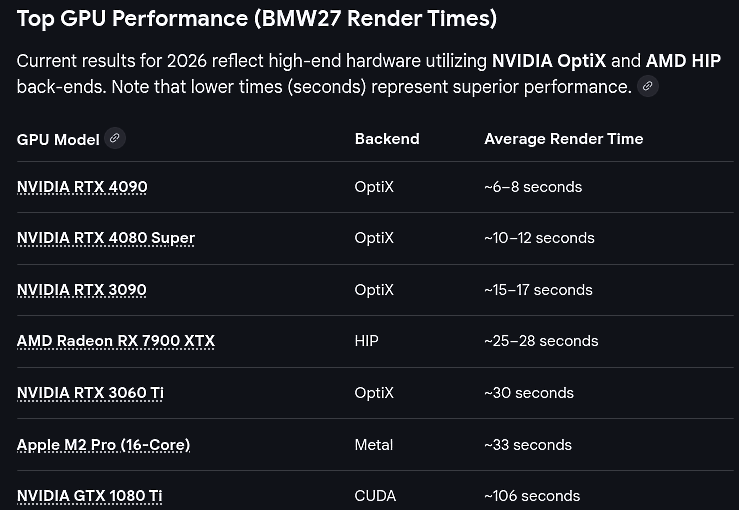
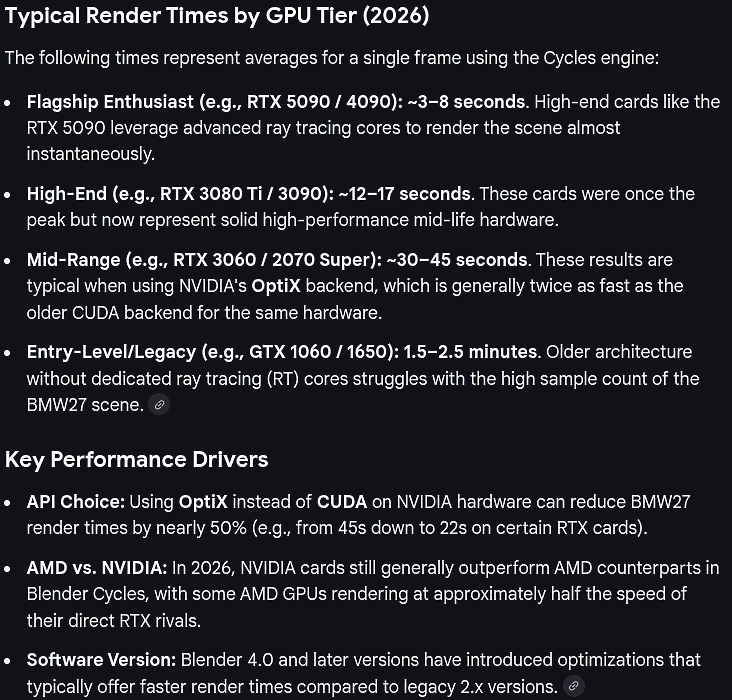
Blender Benchmark 沒有 official Arm64 版本
用 Blender BMW27 約略估計
Arm64 Debian virtualized on apple M-4 4 p-core 320s normalized 1280s/p-core
AMD dual EYPC 9755 128-core 5s normalized 1280s/p-core
cdma2k
cruiseton 嚴格的說是 virtualized M4 core performanc
cruiseton
沒錯啊. 現在 VM performance 和 physical 不會差太多, 再差應該也有 80 % 我的mini pc 8 核 16 緒, VM 永遠只用 4 核還是很順


Mac Mini M4 20s
文章分享
評分
評分
複製連結

今日熱門文章 網友點擊推薦!