個人積分:7151分
文章編號:30822416


個人積分:42分
文章編號:30822615


個人積分:1376分
文章編號:30822642
max4077 wrote:
其實 FTTB也不差...(恕刪)
你們ping google就知道差別了....
不要再看那個Speedtest的ping....那根本不準....
以前準,現在時常不準~
我在學校ping Google都2~3ms的(這才是真的FTTH阿),但用ST測會變成3x ms...
有圖有真相:
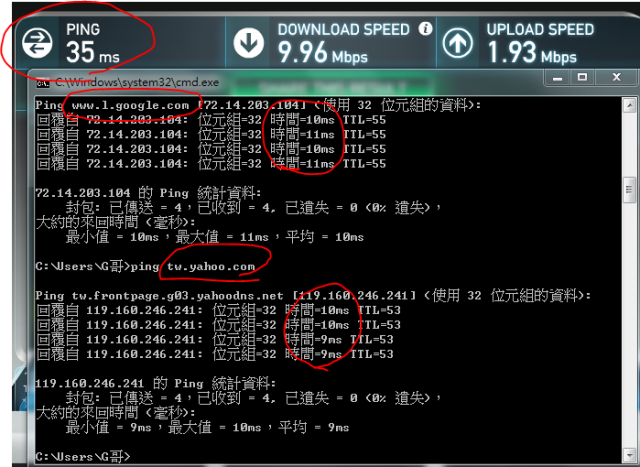
不知道最近有誰有用高於100M的網路去測過Speedtest...
測出來結果永遠破不了100M/s
學校用1G的,以前都可以測到6百多...現在全都只能到9x
但其他網站都可以到6百多....

以前測的:

(學校ping google都1ms......)
一山還有一高,雞蛋還有雞蛋糕...!!!
個人積分:120分
文章編號:30823346


個人積分:173分
文章編號:30823349
個人積分:539分
文章編號:30823934

個人積分:758分
文章編號:30824337
不舒服的魯夫 wrote:
改ping 中華DNS (168.95.1.1) 看看
那是 FTTH 嗎? 看起來應該是 VDSL 的線路.
如果是 FTTH, 應該在 1ms 上下.
tommy@mail:~$ ping -n 168.95.1.1
PING 168.95.1.1 (168.95.1.1) 56(84) bytes of data.
64 bytes from 168.95.1.1: icmp_req=1 ttl=248 time=1.61 ms
64 bytes from 168.95.1.1: icmp_req=2 ttl=248 time=1.42 ms
64 bytes from 168.95.1.1: icmp_req=3 ttl=248 time=1.29 ms
64 bytes from 168.95.1.1: icmp_req=4 ttl=248 time=1.35 ms
64 bytes from 168.95.1.1: icmp_req=5 ttl=248 time=1.34 ms
64 bytes from 168.95.1.1: icmp_req=6 ttl=248 time=1.91 ms
64 bytes from 168.95.1.1: icmp_req=7 ttl=248 time=1.27 ms
64 bytes from 168.95.1.1: icmp_req=8 ttl=248 time=1.31 ms
64 bytes from 168.95.1.1: icmp_req=9 ttl=248 time=1.32 ms
64 bytes from 168.95.1.1: icmp_req=10 ttl=248 time=1.48 ms
64 bytes from 168.95.1.1: icmp_req=11 ttl=248 time=1.31 ms
64 bytes from 168.95.1.1: icmp_req=12 ttl=248 time=1.31 ms
64 bytes from 168.95.1.1: icmp_req=13 ttl=248 time=1.18 ms
64 bytes from 168.95.1.1: icmp_req=14 ttl=248 time=1.38 ms
64 bytes from 168.95.1.1: icmp_req=15 ttl=248 time=1.32 ms
^C
--- 168.95.1.1 ping statistics ---
15 packets transmitted, 15 received, 0% packet loss, time 14015ms
rtt min/avg/max/mdev = 1.187/1.391/1.913/0.173 ms
網路線拉到四樓應該沒差.
我家的線路是 FTTB 到社區一樓, 然後走網路線到四樓住家, 跑出來就是上頭那數字.
另外... 如果是透過分享器, 也有可能是分享器效能不佳造成的.

個人積分:33分
文章編號:30824462
回覆自 168.95.1.1: 位元組=32 時間=21ms TTL=249
回覆自 168.95.1.1: 位元組=32 時間=24ms TTL=249
回覆自 168.95.1.1: 位元組=32 時間=31ms TTL=249
回覆自 168.95.1.1: 位元組=32 時間=22ms TTL=249
回覆自 168.95.1.1: 位元組=32 時間=22ms TTL=249
回覆自 168.95.1.1: 位元組=32 時間=22ms TTL=249
回覆自 168.95.1.1: 位元組=32 時間=22ms TTL=249
回覆自 168.95.1.1: 位元組=32 時間=21ms TTL=249
回覆自 168.95.1.1: 位元組=32 時間=22ms TTL=249
回覆自 168.95.1.1: 位元組=32 時間=23ms TTL=249
回覆自 168.95.1.1: 位元組=32 時間=21ms TTL=249
回覆自 168.95.1.1: 位元組=32 時間=22ms TTL=249
回覆自 168.95.1.1: 位元組=32 時間=21ms TTL=249
回覆自 168.95.1.1: 位元組=32 時間=24ms TTL=249
回覆自 168.95.1.1: 位元組=32 時間=22ms TTL=249
回覆自 168.95.1.1: 位元組=32 時間=22ms TTL=249
回覆自 168.95.1.1: 位元組=32 時間=22ms TTL=249
回覆自 168.95.1.1: 位元組=32 時間=22ms TTL=249
回覆自 168.95.1.1: 位元組=32 時間=22ms TTL=249
回覆自 168.95.1.1: 位元組=32 時間=22ms TTL=249
回覆自 168.95.1.1: 位元組=32 時間=21ms TTL=249
回覆自 168.95.1.1: 位元組=32 時間=36ms TTL=249
回覆自 168.95.1.1: 位元組=32 時間=22ms TTL=249
回覆自 168.95.1.1: 位元組=32 時間=22ms TTL=249
回覆自 168.95.1.1: 位元組=32 時間=22ms TTL=249
回覆自 168.95.1.1: 位元組=32 時間=22ms TTL=249
回覆自 168.95.1.1: 位元組=32 時間=22ms TTL=249
回覆自 168.95.1.1: 位元組=32 時間=22ms TTL=249
回覆自 168.95.1.1: 位元組=32 時間=22ms TTL=249
168.95.1.1 的 Ping 統計資料:
封包: 已傳送 = 29,已收到 = 29, 已遺失 = 0 (0% 遺失),
大約的來回時間 (毫秒):
最小值 = 21ms,最大值 = 36ms,平均 = 22ms
Control-C
^C
C:\Users\Duo\
還是有差啊 = ="
你先拔到獅子的鬃毛.......你的電腦就會比別人快.........

個人積分:5分
文章編號:30824843


個人積分:29分
文章編號:30825232