'vba放在“新建的檔案”
Sub test()
Dim Get_Path As Object, Default_Path As Variant, xls_fullpath As Variant, ttt As Double, Report As String
Dim old_file As Workbook, delsheet() As Variant, check As Range, i As Integer, temp As String
'路徑預設,我的電腦,也可改用其它路徑代替,例如 c:\test\ 、ThisWorkbook.Path
Default_Path = &H11& 'My computer
Set Get_Path = CreateObject("Shell.Application").BrowseForFolder(0, "choose a folder", &H201, Default_Path)
'要刪除的工作表名稱,預訂3個,可用逗點隔開新增名稱
delsheet() = Array("202101", "202102", "202103")
If Get_Path Is Nothing Then
MsgBox "???"
Exit Sub
End If
Application.DisplayAlerts = False
Application.EnableEvents = False
Application.ScreenUpdating = False
Application.Calculation = xlCalculationManual
For Each xls_fullpath In Get_Path.items
ttt = Timer
DoEvents
'檔名可用萬用字元過濾,如果沒指定
'預設開啟同目錄下(1層,不含子目錄),所有xls? 檔(刪除用vba檔會自動略過)
If xls_fullpath.Path Like "*.xls*" And Not xls_fullpath.isfolder And xls_fullpath.Name & ".xlsm" <> ThisWorkbook.Name Then
Set old_file = Workbooks.Open(xls_fullpath.Path, , False)
For i = 0 To UBound(delsheet())
'有同名稱工作表=>刪除
If checksheet(old_file, delsheet(i)) = True Then
temp = temp & delsheet(i) & "=>OK,"
old_file.Sheets(delsheet(i)).Delete
Else
'沒有工作表
temp = temp & delsheet(i) & "=>Error,"
End If
Next i
temp = old_file.Name & vbNewLine & temp & ":" & Timer - ttt & "秒" & vbNewLine
old_file.Close 1
Set old_file = Nothing
End If
Report = Report & temp
temp = ""
Next
Application.DisplayAlerts = True
Application.EnableEvents = True
Application.ScreenUpdating = True
Application.Calculation = xlCalculationAutomatic
Set Get_Path = Nothing
MsgBox IIf(Report = "", "excel file?", Report)
'程式結束後,report字串是簡易的狀況回報
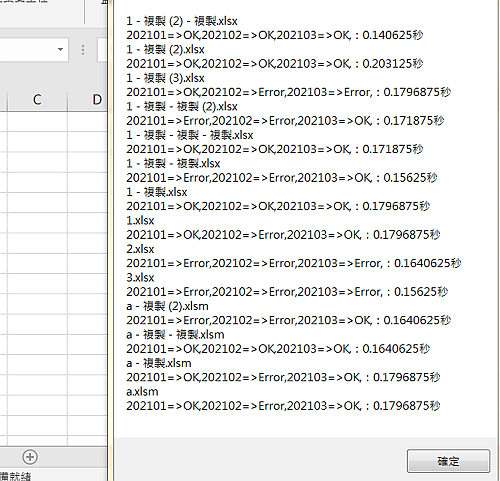
End Sub
'利用on error,不用迴圈,快速檢查是否有指定的工作表名稱
Function checksheet(wb As Workbook, sheet_name) As Boolean
Dim check As Range
On Error Resume Next
Set check = wb.Sheets(sheet_name).Range("a1")
If Err.Number <> 0 Then checksheet = False Else checksheet = True
On Error GoTo 0
End Function