足足一年未更新...
加上很多網站不支援,我也不得不放棄了~
目前試用Firefox 119.0版...
擴充元件雖然沒能找足替代的!
但大致上,已經相近長年使用Waterfox所養成的操作方式~
現在有個問題,我Google不著解方...
想請教大家看看有沒有版友知道!
Waterfox有個"重啟"按鈕~

Firefox應該也有,但好像被拿掉了!
我想請問,有沒有辦法重現重新啟動按鈕?
目前折衷方案是 about:profiles
然後點擊:正常重新啟動
總是覺得不夠直覺...
另外我在這篇討論下方看到
https://superuser.com/questions/1283297/is-it-possible-to-quickly-restart-firefox-quantum-v57-or-up
There seems to be a new method. You can use the Actions search shortcut > (check your settings) in the address bar and then just type restart and select the suitable action, but you have to activate it first by setting browser.urlbar.quickactions.enabled to true in about:config.Firefox 119.0版沒有 browser.urlbar.quickactions.enabled
external reference: https://www.makeuseof.com/enable-quick-action-commands-firefox-edge/
所以我自己新增並設置為true...
在網址欄位裡輸入>並按空白鍵...
確實出現"重新啟動Firefox"的快速鍵!
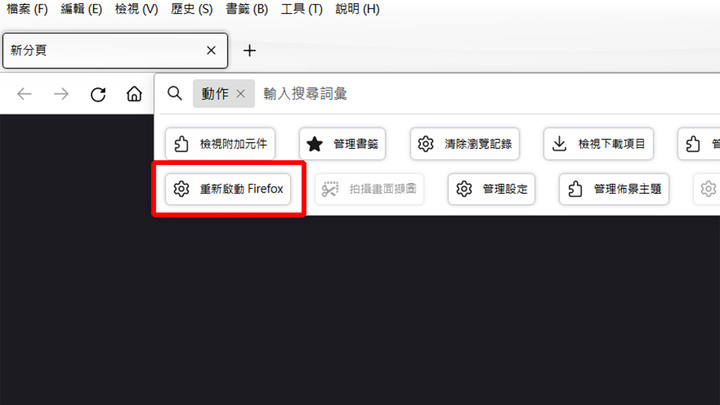
但這操作同樣不夠直覺...
那麼,那個"重新啟動Firefox"的快速鍵~
有沒有什麼辦法拉到檔案選單裡供操作?
謝謝~