個人積分:0分
文章編號:10901571

個人積分:0分
文章編號:10912579


個人積分:15分
文章編號:10915214
個人積分:0分
文章編號:10927951

個人積分:358分
文章編號:10935463
edonff8 wrote:
感謝longerlo...(恕刪)
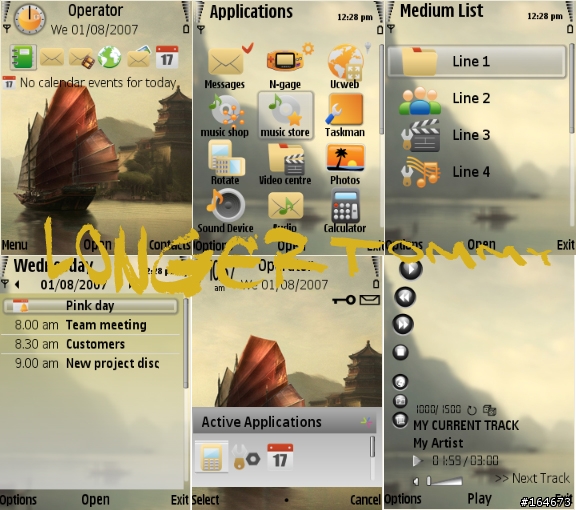
 NOKIA 默認 15 個文件夾( 包括音樂和網際網路以及應用程式的icon)
務必先行破解手機再加第三方軟件.....等才可轉換 icon ( 詳細可閱以下文章,轉貼外國 forum )
Hello to all!
One of the main problems of Carbide UI is that it's not supporting many of built in applications and folders of some phone models. So many of thememakers adding many icons for built in application as 3rd Party Applications, but icons for folders (Music, Utilities etc.) was impossible to change, until today...
Today I've founded a way to change some of folder icons. I will describe it in 3 steps.
First of all we need to hack OS of your phone. I'm not going to describe how to do it, you can find tutorials on many sites. After "unlocking" of OS we need a file that describes Application Shell icons.
1. Use one of the file manager applications (X-Plore, Y-Browser) and go to: C:/Private/101f4cd2/Content. Copy file appshelldata.xml file to your PC.
2. Open appshelldata.xml with Notepad or WordPad and find folder name that you need (On a screenshot is a Music Folder icon). Info that we need is major_id and minor_id.
3. Go to Carbide UI => Third Party Icons and add a new icon, BUT change Type from Application to Non-Application. Now add Major ID and Minor ID. That's all........
(Thanks zeq (Atlantis®) )
小弟一直沒有破解手機,所以主題沒有另加上 15 個文件夾...sorry

個人積分:358分
文章編號:10935495

" Lonely "

歡迎大家下載私人擁有,但切勿作商業或售買用途,多謝合作

 分享是樂趣,
 回覆是義務,
 下載是快樂,
 回應是鼓勵 .
Enjoy

附加壓縮檔: 200903/mobile01-2cc25da69241025ddc38b4ee441d5cc7.zip

個人積分:0分
文章編號:10949302

個人積分:358分
文章編號:10964434
個人積分:358分
文章編號:10964448

歡迎大家下載私人擁有,但切勿作商業或售買用途,多謝合作
分享是樂趣, 回覆是義務, 下載是快樂, 回應是鼓勵 .Enjoy
附加壓縮檔: 200903/mobile01-7c0482d0fa18388664a9e9f8f84e4229.zip

個人積分:0分
文章編號:10967561